Compare commits
| Author | SHA1 | Date | |
|---|---|---|---|
 Collimo release |
b943d794e8 | ||
|
Collimo release
|
d31f29d767 |
No files matched your search
@@ -1,15 +1,15 @@
|
||||
Ferrule
|
||||
Copyright (c) 2026 the Ferrule authors. All rights reserved.
|
||||
Collimo
|
||||
Copyright (c) 2026 COLLIMO LLC. All rights reserved.
|
||||
|
||||
This software and its source code are proprietary and confidential. No
|
||||
licence to use, copy, modify, merge, publish, distribute, sublicense or sell
|
||||
them, in whole or in part, is granted except by a written agreement with
|
||||
the copyright holders.
|
||||
COLLIMO LLC.
|
||||
|
||||
Ferrule is distributed to customers as a built image. Running it is
|
||||
Collimo is distributed to customers as a built image. Running it is
|
||||
governed by the terms of the licence under which that image was obtained.
|
||||
|
||||
THE SOFTWARE IS PROVIDED "AS IS", WITHOUT WARRANTY OF ANY KIND, EXPRESS OR
|
||||
IMPLIED, INCLUDING BUT NOT LIMITED TO THE WARRANTIES OF MERCHANTABILITY,
|
||||
FITNESS FOR A PARTICULAR PURPOSE AND NONINFRINGEMENT, EXCEPT AS A WRITTEN
|
||||
AGREEMENT WITH THE COPYRIGHT HOLDERS PROVIDES.
|
||||
AGREEMENT WITH COLLIMO LLC PROVIDES.
|
||||
+287
-90
@@ -1,21 +1,21 @@
|
||||
# Portainer GitOps deployment
|
||||
|
||||
Portainer reads the compose file from the public `ferrule-deploy`
|
||||
Portainer reads the compose file from the public `collimo-deploy`
|
||||
repository and pulls the published image. Nothing is built on the Docker
|
||||
host. After the initial setup, updates are a single click — or zero clicks
|
||||
with a webhook.
|
||||
|
||||
## Before you start
|
||||
|
||||
- Ferrule runs from a published image, a built binary: nothing is compiled
|
||||
- Collimo runs from a published image, a built binary: nothing is compiled
|
||||
on your Docker host. Portainer reads only the compose file from the
|
||||
repository.
|
||||
- Portainer must reach
|
||||
`https://github.com/ferrulehq/ferrule-deploy`. It is public,
|
||||
`https://github.com/collimohq/collimo-deploy`. It is public,
|
||||
so no account or token is needed.
|
||||
- The Docker host needs outbound internet to pull the Ferrule and
|
||||
- The Docker host needs outbound internet to pull the Collimo and
|
||||
VictoriaMetrics images. A licensed install also fetches
|
||||
`https://license.ferrulehq.dev/revoked` once a day (see "Online
|
||||
`https://license.collimo.dev/revoked` once a day (see "Online
|
||||
confirmation").
|
||||
- Nothing goes on the host filesystem. No bind mounts, no config files.
|
||||
|
||||
@@ -51,21 +51,21 @@ console.
|
||||
|
||||
The image is public: Portainer pulls it with no registry login. It holds
|
||||
the built binary only, never the source. It is published on GitHub's
|
||||
container registry, `ghcr.io/ferrulehq/ferrule`. If it ever moves,
|
||||
`FERRULE_IMAGE` is the one line that changes.
|
||||
container registry, `ghcr.io/collimohq/collimo`. If it ever moves,
|
||||
`COLLIMO_IMAGE` is the one line that changes.
|
||||
|
||||
---
|
||||
|
||||
## Step 3 — Create the stack
|
||||
|
||||
1. **Stacks → Add stack**.
|
||||
2. Name it `ferrule` — lowercase, no spaces. Portainer uses this as
|
||||
2. Name it `collimo` — lowercase, no spaces. Portainer uses this as
|
||||
the compose project name, which also keeps its volumes apart from any
|
||||
other stack's.
|
||||
3. Choose **Repository** as the build method.
|
||||
4. Fill in:
|
||||
- **Repository URL** —
|
||||
`https://github.com/ferrulehq/ferrule-deploy`
|
||||
`https://github.com/collimohq/collimo-deploy`
|
||||
- **Repository reference** — `refs/heads/main`
|
||||
- **Compose path** — `docker-compose.yml`
|
||||
- **Authentication** — off; the repository is public. Turn it on only
|
||||
@@ -83,10 +83,14 @@ container registry, `ghcr.io/ferrulehq/ferrule`. If it ever moves,
|
||||
|
||||
Scroll to **Environment variables** and switch to **Advanced mode** if
|
||||
offered — you can paste the whole block at once. The contents of
|
||||
`stack.env.example`, with your values filled in:
|
||||
`stack.env.example`, with your values filled in.
|
||||
|
||||
A `$` in any value must be written `$$`. Compose reads `$name` as a
|
||||
variable, so a password such as `$ecret-pass` would arrive as `-pass`.
|
||||
The setup wizard writes the `$$` for you.
|
||||
|
||||
```
|
||||
FERRULE_VERSION=0.9.0
|
||||
COLLIMO_VERSION=0.9.0
|
||||
|
||||
UNIFI_HOST=https://192.168.1.1
|
||||
UNIFI_API_KEY=gateway-api-key
|
||||
@@ -107,7 +111,7 @@ Everything else has a working default. Once the dashboard is up,
|
||||
starting from what the stack is running with: change what you need and it
|
||||
gives the lines to paste here. It never asks for a secret. A credential from
|
||||
elsewhere gets a placeholder to replace in Portainer, and the keys and
|
||||
passwords that are Ferrule's own (`BACKUP_KEY`, `SETTINGS_KEY`,
|
||||
passwords that are Collimo's own (`BACKUP_KEY`, `SETTINGS_KEY`,
|
||||
`ADMIN_PASSWORD`, the database passwords) can be made in the browser, never
|
||||
sent anywhere.
|
||||
|
||||
@@ -115,15 +119,17 @@ Add these only if you need them:
|
||||
|
||||
| Name | Default | When to change it |
|
||||
|---|---|---|
|
||||
| `FERRULE_VERSION` | **required** | the release to run, such as `0.9.0`; `qa` for what is under test. Never `latest` |
|
||||
| `FERRULE_IMAGE` | `ghcr.io/ferrulehq/ferrule` | where the image is published; change it only if told to |
|
||||
| `COLLIMO_VERSION` | **required** | the release to run, such as `0.9.0`; `qa` for what is under test. Never `latest` |
|
||||
| `COLLIMO_IMAGE` | `ghcr.io/collimohq/collimo` | where the image is published; change it only if told to |
|
||||
| `WEB_PORT` | `8090` | something else already has 8090 |
|
||||
| `UNIFI_ENABLED` | `true` | `false` to watch only hypervisors and storage, or to try this stack beside an existing one without polling the controller twice |
|
||||
| `SOURCE_1` … `SOURCE_8` | empty | a hypervisor or storage system per slot, see below |
|
||||
| `SOURCE_n_SECRET` | empty | the matching token, password or key |
|
||||
| `SOURCE_1` … `SOURCE_8` | empty | a hypervisor or storage system per slot, or a list of SNMP switches, UPSes or Redfish servers, see below |
|
||||
| `SOURCE_n_SECRET` | empty | the matching token, password, key, BMC password or SNMP community |
|
||||
| `CHECKS` | empty | up-checks for anything with an address: `ping <host>`, `http <URL>` or `tcp <host:port>`, separated by `;`, each with optional `name=`, `every=` and `timeout=`. See below |
|
||||
| `POLL_INTERVAL` | `30s` | values below `10s` are clamped |
|
||||
| `REQUEST_TIMEOUT` | `20s` | how long one request to a console may take |
|
||||
| `UNIFI_SITE` | `default` | you renamed your site |
|
||||
| `PORT_SLEEPS` | empty | switch ports whose computer sleeps, as `mac/port` separated by commas: a drop to 100 Mb/s or lower there is expected. The slow-link alert's button writes it |
|
||||
| `UNIFI_OS` | `true` | `false` for a self-hosted standalone controller |
|
||||
| `UNIFI_VERIFY_TLS` | `false` | you installed a trusted cert on the console |
|
||||
| `PROTECT_ENABLED` | `true` | `false` if you do not run Protect |
|
||||
@@ -132,7 +138,7 @@ Add these only if you need them:
|
||||
| `WAN_ENABLED` | `true` | `false` if there is no WAN here worth watching |
|
||||
| `WAN_POLL_INTERVAL` | `60s` | paces the v2 endpoints only; floor `30s` |
|
||||
| `WAN_DASHBOARD_SCALE` | `24h` | `7d` asks the controller for its widest window |
|
||||
| `SPEEDTEST_INTERVAL` | `15m` | how often speedtest history is re-read |
|
||||
| `SPEEDTEST_INTERVAL` | `15m` | how often speedtest history is re-read; `0` stops reading it |
|
||||
| `BACKFILL_ON_START` | `true` | `false` to start recording forward only |
|
||||
| `LEDGER_RETENTION` | `8760h` | how long the outage archive keeps events |
|
||||
| `PROBE_TARGETS` | empty | set it to turn the demarcation probe on, see below |
|
||||
@@ -152,9 +158,10 @@ SOURCE_1=proxmox https://pve1.lab:8006 name=pve-lab user=telemetry@pve!ro
|
||||
SOURCE_1_SECRET=<API token secret>
|
||||
```
|
||||
|
||||
Kinds: `proxmox`, `pbs`, `vmware`, `synology`, `qnap`, `truenas`. The
|
||||
dashboard's **Settings → Add a source** generates both lines and says what
|
||||
read-only account to create on that system.
|
||||
Kinds: `proxmox`, `pbs`, `vmware`, `xcpng`, `synology`, `qnap`, `truenas`, and
|
||||
`snmp` for switches, `ups` for UPSes and `redfish` for servers through
|
||||
their BMC, which take several addresses in one slot (see below). The dashboard's **Settings → Add a source** generates both
|
||||
lines and says what read-only account to create on that system.
|
||||
|
||||
Fixed slot names are deliberate: Portainer passes a variable into the
|
||||
container only when `docker-compose.yml` names it, so a free-form name would
|
||||
@@ -165,8 +172,8 @@ otherwise (30 seconds at the least), and a self-signed certificate is
|
||||
accepted unless the slot says `tls=verify`.
|
||||
|
||||
Where a system keeps its own alarms (vCenter, TrueNAS), they are the alerts
|
||||
and Ferrule adds no thresholds beside them. Where it does not (Proxmox VE,
|
||||
PBS, Synology, QNAP), Ferrule raises a few: storage at 90% full is a
|
||||
and Collimo adds no thresholds beside them. Where it does not (Proxmox VE,
|
||||
PBS, Synology, QNAP), Collimo raises a few: storage at 90% full is a
|
||||
warning and at 95% is bad, and anything the system itself calls degraded,
|
||||
crashed, failed or offline. Alerts already true when the collector starts
|
||||
are never sent as notifications.
|
||||
@@ -195,12 +202,38 @@ vCenter's triggered alarms. Templates are not counted as machines.
|
||||
|
||||
Alerts come from vCenter itself: each triggered alarm that nobody has
|
||||
acknowledged is a `vcenter_alarm` alert, red as critical and yellow as a
|
||||
warning, and notifies like any other. Ferrule adds no thresholds of its own;
|
||||
warning, and notifies like any other. Collimo adds no thresholds of its own;
|
||||
vCenter's defaults already watch host connection, CPU, memory and datastore
|
||||
usage, and you tune them there. **Acknowledging an alarm in vCenter clears it
|
||||
in Ferrule.** Alarms already open when the collector starts are not sent as
|
||||
in Collimo.** Alarms already open when the collector starts are not sent as
|
||||
notifications.
|
||||
|
||||
#### XCP-ng, through Xen Orchestra
|
||||
|
||||
XCP-ng 8.3, read through Xen Orchestra's REST API: XCP-ng itself has no
|
||||
read-only account. One slot is one Xen Orchestra, and every pool it manages
|
||||
is read. In Xen Orchestra, as an admin: add a user with permission `none`,
|
||||
copy the **Read only** role (it's a template and can't be given directly),
|
||||
give the copy to the user, and make the user a token with
|
||||
`"expiresIn":"0.5 year"`. The commands are on the
|
||||
[XCP-ng docs page](docs/site/docs/connect/xcpng.md).
|
||||
|
||||
```
|
||||
SOURCE_1=xcpng https://xo.example.com name=xo
|
||||
SOURCE_1_SECRET=<the token>
|
||||
```
|
||||
|
||||
What it reads: every pool and its HA; every host's power state, maintenance,
|
||||
pending reboot, CPU, memory, uptime and version; every storage repository's
|
||||
size, use and allocation (ISO libraries left out); every VM's power state and
|
||||
snapshots, CPU for the busiest fifteen; alarms and the newest events.
|
||||
|
||||
Alerts: a host not running (`host_offline`), a storage repository at 90% or
|
||||
95% (`storage_full`), an alarm raised within the hour (`xcpng_alarm`: an
|
||||
alarm stays listed after its cause clears, so older ones are history), and
|
||||
the slot's own token expiring within a fortnight (`xcpng_token`). Every Xen
|
||||
Orchestra token expires.
|
||||
|
||||
#### Proxmox VE, with Ceph
|
||||
|
||||
One slot per cluster; any node's address will do. In the web UI, under
|
||||
@@ -255,7 +288,7 @@ SOURCE_5_SECRET=<the token secret>
|
||||
```
|
||||
|
||||
PBS separates the token and its secret with a colon where Proxmox VE uses an
|
||||
equals sign; Ferrule handles that. What it reads: every datastore's use and
|
||||
equals sign; Collimo handles that. What it reads: every datastore's use and
|
||||
PBS's own estimate of when it fills; the latest run of every job in the
|
||||
last week (backups, verify, prune, sync, garbage collection); and each
|
||||
backup group's last backup, oldest first.
|
||||
@@ -292,7 +325,7 @@ and DSM saying the box is hot.
|
||||
|
||||
#### QNAP, over SNMPv3
|
||||
|
||||
QTS and QuTS hero have no read-only API account, so Ferrule reads QNAP's own
|
||||
QTS and QuTS hero have no read-only API account, so Collimo reads QNAP's own
|
||||
SNMP MIB, over SNMPv3 with authentication and encryption. In **Control Panel
|
||||
→ Network & File Services → SNMP**:
|
||||
|
||||
@@ -321,7 +354,7 @@ What it reads: model, firmware, uptime, CPU, memory, temperatures, fans;
|
||||
every disk's (and M.2 drive's) status and temperature; every storage pool's
|
||||
status and use, and every RAID group's status. QNAP has two MIBs: current
|
||||
QTS and QuTS hero fill the newer one (QTS-MIB) and leave model, uptime and
|
||||
memory out of the older (NAS-MIB). Ferrule reads both and takes the newer
|
||||
memory out of the older (NAS-MIB). Collimo reads both and takes the newer
|
||||
wherever it answers. Alerts as for Synology.
|
||||
|
||||
#### TrueNAS
|
||||
@@ -345,6 +378,86 @@ TrueNAS 25.04 marked the REST API this uses as deprecated, in favour of
|
||||
JSON-RPC over a WebSocket. It still answers through 25.10; if a later
|
||||
release drops it, the slot will say so.
|
||||
|
||||
#### Switches from any maker, over SNMP
|
||||
|
||||
Kind `snmp` reads managed switches over the standard MIBs (SNMPv2-MIB,
|
||||
IF-MIB, EtherLike-MIB, ENTITY-MIB and ENTITY-SENSOR-MIB, LLDP-MIB), whoever
|
||||
made them. One slot lists every switch that shares a community or SNMPv3
|
||||
user, comma-separated, up to 64; `:port` after an address if it is not 161.
|
||||
|
||||
```
|
||||
SOURCE_3=snmp 192.168.1.2,192.168.1.3 name=core version=2c
|
||||
SOURCE_3_SECRET=<read-only community>
|
||||
|
||||
SOURCE_4=snmp 10.0.1.2 name=dc version=3 user=telemetry auth=sha priv=aes
|
||||
SOURCE_4_SECRET=<auth passphrase>:<privacy passphrase>
|
||||
```
|
||||
|
||||
`version=` is `2c` or `3`; without it, a slot with `user=` is SNMPv3 and one
|
||||
without is SNMPv2c. For SNMPv3, `auth=` is `sha` (the default) or `md5`,
|
||||
`priv=` is `aes` (the default) or `des`, and the secret is both passphrases
|
||||
joined by the first colon. SNMPv2c sends its community in clear: keep it to
|
||||
the management network.
|
||||
|
||||
Each switch becomes a device on the LAN tab, beside the UniFi devices, with
|
||||
the same alerts: offline, reboots (from uptime), firmware changes, errors
|
||||
climbing, flapping, a link slower than it has run, half duplex, a hot
|
||||
chassis, and a fan the sensor reports not working. Only physical Ethernet
|
||||
ports are read; whether one is a fibre cage is a guess from its name, and
|
||||
optic diagnostics are in no standard MIB. A switch that stops answering is
|
||||
offline under its own name; a slot where nothing has ever answered, or every
|
||||
switch refuses the credentials, is the slot's error instead.
|
||||
|
||||
#### UPSes, over UPS-MIB
|
||||
|
||||
Kind `ups` reads RFC 1628, which most UPS network cards answer: the
|
||||
battery's status, charge and minutes left, seconds on battery, input
|
||||
voltage, where the output comes from and its load, and the UPS's own alarms.
|
||||
Its slot takes the same addresses and credentials as `snmp`:
|
||||
|
||||
```
|
||||
SOURCE_5=ups 192.168.1.20,192.168.1.21 name=racks
|
||||
SOURCE_5_SECRET=<read-only community>
|
||||
```
|
||||
|
||||
Each UPS is a panel on the **Power and servers** tab. Alerts: on battery
|
||||
(`ups_on_battery`) and battery low or depleted (`ups_battery_low`) are bad;
|
||||
battery needs replacing (`ups_battery_replace`, from the UPS's own alarm)
|
||||
and 90% load or more (`ups_overload`) are warnings; ten minutes of runtime
|
||||
or less is a warning and five or less is bad (`ups_runtime_low`). PDUs are
|
||||
not read: each maker's speaks its own MIB.
|
||||
|
||||
#### Servers, over Redfish
|
||||
|
||||
Kind `redfish` reads a server through its BMC (Dell iDRAC, HPE iLO,
|
||||
Supermicro, Lenovo XCC, or any other that speaks DMTF Redfish), following
|
||||
the links from `/redfish/v1/`: the system's maker, model, serial, BIOS,
|
||||
power state, health, processors and memory; its drives; each chassis's
|
||||
temperatures with the BMC's thresholds, fans, power supplies, redundancy
|
||||
and power drawn; and the BMC's firmware. It signs in with HTTP Basic on each
|
||||
request and opens no Redfish session. One slot lists every BMC sharing an
|
||||
account, each with `https://`, comma-separated; `user=` is required and the
|
||||
secret is the password:
|
||||
|
||||
```
|
||||
SOURCE_7=redfish https://192.168.1.31,https://192.168.1.32 name=rack-a user=collimo
|
||||
SOURCE_7_SECRET=<the BMC account's password>
|
||||
```
|
||||
|
||||
Make the account with the lowest role that reads: iDRAC **Read Only**, iLO
|
||||
**Login** privilege only, XCC **ReadOnly**. On Supermicro the lowest that
|
||||
reads Redfish is **Operator**, which can also power the server, so keep that
|
||||
password to the stack.
|
||||
|
||||
Each server is a panel on the **Power and servers** tab, named by its BMC's
|
||||
address. Alerts, at the BMC's own levels, warning or bad: the server's
|
||||
overall health (`server_health`), a temperature at its non-critical or
|
||||
critical threshold (`server_temp`), a fan (`server_fan`), a supply failed or
|
||||
redundancy lost (`server_psu`), a drive not OK or predicting failure
|
||||
(`server_drive`); a BMC that stops answering is `source_down`. The classic
|
||||
Thermal and Power resources are read; a BMC offering only ThermalSubsystem
|
||||
and PowerSubsystem says so on its panel.
|
||||
|
||||
### Inventory reports
|
||||
|
||||
With a vCenter or Proxmox VE slot, the Virtualization tab has an
|
||||
@@ -376,20 +489,20 @@ shows), and the inventories it read, with their fingerprints.
|
||||
**Evidence that history was not changed.** Each inventory records a SHA-256
|
||||
fingerprint of itself and of the one before, so the runs form a chain:
|
||||
editing or deleting a run breaks every fingerprint after it. The Sources
|
||||
sheet shows both. Ferrule checks the whole chain when it starts and after
|
||||
sheet shows both. Collimo checks the whole chain when it starts and after
|
||||
every run, and raises **Inventory history changed** if anything fails. A
|
||||
run that `INVENTORY_KEEP` expires is marked expired, not deleted, so the
|
||||
chain stays whole. Because whoever can change the files could rebuild a
|
||||
chain kept beside them, each fingerprint is also written to every backup
|
||||
target as `fingerprint-<run>.json` (never pruned) and to the database copy,
|
||||
which Ferrule checks against its files. For the strongest evidence, keep the
|
||||
which Collimo checks against its files. For the strongest evidence, keep the
|
||||
backup share under a snapshot schedule the stack's credentials cannot
|
||||
delete (Synology and QNAP immutable snapshots, TrueNAS periodic snapshots),
|
||||
delete (locked snapshots on Synology or QNAP, periodic ones on TrueNAS),
|
||||
or use S3 with Object Lock.
|
||||
|
||||
**A copy in PostgreSQL**, for Grafana, Power BI or anything else with a
|
||||
PostgreSQL connector, no plugin needed. Every run goes into schema
|
||||
`ferrule`: a `runs` table, one table per sheet (`vms`, `disks`, `nics`,
|
||||
`collimo`: a `runs` table, one table per sheet (`vms`, `disks`, `nics`,
|
||||
`partitions`, `snapshots`, `hosts`, `datastores`, `clusters`, `health`,
|
||||
`sources`, `changes`), `vm_attributes` for vCenter's custom attributes, and a
|
||||
`latest_` view of each sheet for the fleet as the newest run saw it. Every
|
||||
@@ -403,10 +516,10 @@ later, change `INVENTORY_DB_PASSWORD` and redeploy the whole stack: the
|
||||
database container sets the new one within a minute. (Postgres itself
|
||||
keeps the password it was first made with; the stack's health check puts
|
||||
the new one in.) Should that ever not take, removing the stack's
|
||||
`postgres-data` volume loses nothing: the database is a copy, and Ferrule
|
||||
`postgres-data` volume loses nothing: the database is a copy, and Collimo
|
||||
copies every run back in. To use a PostgreSQL you
|
||||
run, set `INVENTORY_DB_URL` instead. Set `INVENTORY_DB_READER_PASSWORD`, at
|
||||
least 12 characters, and Ferrule makes a read-only `ferrule_reader` role for
|
||||
least 12 characters, and Collimo makes a read-only `collimo_reader` role for
|
||||
reporting tools to sign in as, so they never hold the writer's password. A
|
||||
shorter one is refused: the role is not made, the inventory panel says why,
|
||||
and everything else carries on.
|
||||
@@ -415,14 +528,35 @@ and everything else carries on.
|
||||
|---|---|---|
|
||||
| `INVENTORY` | `on` | `off` stops the daily run; taking one by hand still works |
|
||||
| `INVENTORY_AT` | `02:30` | when the daily run is taken, in `TZ` |
|
||||
| `INVENTORY_KEEP` | `365` | days of runs to keep, in Ferrule's files and the database copy alike; `2557` keeps seven years, as SOX asks. The newest two are always kept |
|
||||
| `INVENTORY_KEEP` | `365` | days of runs to keep, in Collimo's files and the database copy alike; `2557` keeps seven years, as SOX asks. The newest two are always kept |
|
||||
| `INVENTORY_DB_URL` | empty | `postgres://user:password@host:5432/database?sslmode=verify-full` for a PostgreSQL you run |
|
||||
| `INVENTORY_DB_PASSWORD` | empty | the writer's password; on its own, the stack's `postgres` profile is used |
|
||||
| `INVENTORY_DB_READER_PASSWORD` | empty | at least 12 characters; makes or updates `ferrule_reader`, sent as a SCRAM verifier, never as text |
|
||||
| `INVENTORY_DB_READER_PASSWORD` | empty | at least 12 characters; makes or updates `collimo_reader`, sent as a SCRAM verifier, never as text |
|
||||
| `INVENTORY_DB_CA` | empty | your CA certificate, PEM, for a server whose certificate it signed; turns on `verify-full` |
|
||||
| `INVENTORY_DB_BIND` | `127.0.0.1` | where the bundled database listens on the Docker host; `0.0.0.0` for Power BI on another machine |
|
||||
| `INVENTORY_DB_PORT` | `5432` | the bundled database's port on the Docker host |
|
||||
|
||||
#### Capacity planning (paid)
|
||||
|
||||
Every hypervisor and storage poll is folded into one summary per cluster,
|
||||
host, datastore and pool per day (average, 95th percentile, peak and
|
||||
capacity), kept for two years in `capacity/` beside the archive, whatever the
|
||||
edition. On first start the inventory runs already held seed the disk and
|
||||
allocation history. The **Capacity** tab forecasts when each reaches its
|
||||
threshold, with a range, and raises `capacity_runway` when that is close.
|
||||
|
||||
| Variable | Default | |
|
||||
|---|---|---|
|
||||
| `CAPACITY_THRESHOLDS` | `cpu=80,mem=80,disk=85,pool=85` | the share of usable capacity, in %, forecasts are for; also `alloc_cpu`, `alloc_mem` and `alloc_disk` against the ratios below (100 by default). `pool` is Ceph and other replicated storage, planned to nearfull |
|
||||
| `CAPACITY_RUNWAY` | `warn=90,bad=30` | days left at which a forecast warns, and is critical |
|
||||
| `CAPACITY_RATIOS` | `vcpu=4,vmem=1,disk=1.5` | allocation limits: vCPUs per core, VM memory per byte of host memory, provisioned disk per byte |
|
||||
| `CAPACITY_VM_SIZE` | `vcpu=4,mem=16,disk=100` | the VM "how many more fit" counts in, memory and disk in GB |
|
||||
| `CAPACITY_SUMMARY_TO` | empty | who gets the monthly capacity summary on the 1st, through the SMTP server alert email uses; its own list, not `SMTP_TO` |
|
||||
| `CAPACITY_SUMMARY_BY` | empty | a "Prepared by" name on the summary |
|
||||
| `CAPACITY_HOST` | empty | the host "What to buy" plans in, such as `cores=64,mem=1024` (memory in GB); empty: each cluster's largest |
|
||||
| `CAPACITY_DISK_TBW` | empty | each drive model's rated terabytes written, such as `CT1000P310SSD8=220; Samsung SSD 990 PRO 1TB=600`, for disk wear |
|
||||
| `CAPACITY_HA` | empty | hosts kept spare per cluster, such as `Prod=1,lab=0`: usable capacity is then the cluster less its largest hosts |
|
||||
|
||||
What Proxmox VE cannot tell a read-only token is left out rather than asked
|
||||
for: a VM's IP addresses, partitions and guest OS need the QEMU guest agent
|
||||
and a privilege PVEAuditor does not have. A container's static address is in
|
||||
@@ -448,7 +582,7 @@ with the model that gave it.
|
||||
**Recommend fixes**, when ticked, asks for a fix for each problem as well:
|
||||
steps in order, what carrying them out could disrupt, and how to check it
|
||||
worked. Each shows on its finding as a suggested fix, to check before
|
||||
running. It is advice: Ferrule runs nothing, and the model is told to give
|
||||
running. It is advice: Collimo runs nothing, and the model is told to give
|
||||
an exact command or menu path only where it is sure of it.
|
||||
|
||||
The assistant is paid, whichever model answers: the trial or a license. When
|
||||
@@ -486,7 +620,7 @@ anything else is not, with no setting to say otherwise. With sign-in off
|
||||
there are no roles, as for everything else.
|
||||
|
||||
Each model takes one question at a time; asking one that is busy says so at
|
||||
once, and another model can be picked. Every five minutes Ferrule asks each
|
||||
once, and another model can be picked. Every five minutes Collimo asks each
|
||||
model for its list of models, which costs nothing, and the panel shows
|
||||
whether it answered, refused its key, or could not be reached. There is no
|
||||
automatic switch to another model: a question goes only where its preview
|
||||
@@ -498,7 +632,7 @@ said it would.
|
||||
so. In **Settings → Stack environment**, each slot is a provider list and
|
||||
its fields, and **Move to AI_1**, under the old single-model settings,
|
||||
writes the old variables as an `AI_1` line and clears them; paste the key
|
||||
into `AI_1_KEY`, since Ferrule never sees it. A slot that cannot be read is shown
|
||||
into `AI_1_KEY`, since Collimo never sees it. A slot that cannot be read is shown
|
||||
on Settings with the reason and never stops the stack.
|
||||
|
||||
**LM Studio:** in the Developer tab, start the server and turn on **Serve on
|
||||
@@ -508,7 +642,7 @@ The first question reads the whole case file before it answers; on a
|
||||
desktop machine that is usually 20 to 60 seconds.
|
||||
|
||||
**llama.cpp:** start `llama-server` with `--host 0.0.0.0` so it listens on
|
||||
the network, and `--jinja` for the model's own chat template. Ferrule asks
|
||||
the network, and `--jinja` for the model's own chat template. Collimo asks
|
||||
it for its settings at `/props`, so the panel shows "llama.cpp" with the
|
||||
loaded model's name, and the context each question gets, which is `-c`
|
||||
divided by the server's parallel slots (`-np`); `context=` is then not
|
||||
@@ -536,18 +670,27 @@ AI_3_KEY=<from Google AI Studio>
|
||||
|
||||
| Name | Default | Meaning |
|
||||
|---|---|---|
|
||||
| `FERRULE_LICENSE` | empty | a license key, one long line starting `FERRULE1.`. Optional: it can be pasted on Settings instead |
|
||||
| `COLLIMO_LICENSE` | empty | a license key, one long line starting `COLLIMO1.`. Optional: it can be pasted on Settings instead |
|
||||
|
||||
Without a key, a new install runs a **30-day trial** of the paid features,
|
||||
counted from its first start and remembered on the `ledger-data` volume,
|
||||
then carries on as **Community**: free for personal use, with everything for
|
||||
one site. Settings → License shows the edition, the days left and what is
|
||||
paid. Whatever happens to a license, monitoring and alerts never stop: only
|
||||
the paid features pause.
|
||||
**During the private beta** there is no trial, and a key is required:
|
||||
without one in force, Collimo reads nothing, sends no alerts and pushes
|
||||
nothing to VictoriaMetrics, and says **Private beta: not watching** above
|
||||
every tab. A key that is withdrawn, past its expiry and grace, or
|
||||
unconfirmed online for 30 days stops it the same way. The container stays
|
||||
healthy, and entering a key starts watching at the next poll.
|
||||
|
||||
After launch, a new install without a key runs a **30-day trial** of the
|
||||
paid features, counted from its first start and remembered on the
|
||||
`ledger-data` volume, then carries on as **Community**: free for personal
|
||||
use, with everything for one site. Settings → License shows the edition,
|
||||
how long the key is valid (a Business or MSP key can say **Never expires**),
|
||||
what it covers, such as *unlimited sites*, and what is paid. After launch,
|
||||
whatever happens to a license, monitoring and alerts never stop: only the
|
||||
paid features pause.
|
||||
|
||||
**Online confirmation.** A key is checked by its signature, on your host.
|
||||
Ferrule also fetches a signed list of withdrawn keys once a day, from
|
||||
`https://license.ferrulehq.dev/revoked`, so a key that leaks can be
|
||||
Collimo also fetches a signed list of withdrawn keys once a day, from
|
||||
`https://license.collimo.dev/revoked`, so a key that leaks can be
|
||||
withdrawn. The fetch is a plain download: nothing about you, your network
|
||||
or your install is sent. A key that has not been
|
||||
confirmed for 30 days pauses the paid features until the list can be
|
||||
@@ -560,9 +703,35 @@ trial and Community have no key, so they never check.
|
||||
License and press Apply. It is checked there and then, used at once with no
|
||||
restart, and kept on the archive volume as `license.json`, so it travels with
|
||||
archive backups and comes back with a restore. **Remove license** takes it
|
||||
off again. Each change goes in the audit log. When `FERRULE_LICENSE` is set,
|
||||
off again. Each change goes in the audit log. When `COLLIMO_LICENSE` is set,
|
||||
it always wins, and the box on Settings is locked.
|
||||
|
||||
### Several sites: the hub (MSP, or Business with several offices)
|
||||
|
||||
| Name | Default | Meaning |
|
||||
|---|---|---|
|
||||
| `COLLIMO_ROLE` | `standalone` | `collector` at each site, `hub` for the one that shows them all. `standalone` is one site on its own |
|
||||
| `HUB_URL` | empty | on a hub: the address collectors reach it at. It goes into every enrolment code |
|
||||
| `HUB_ENROL` | empty | on a collector: the enrolment code made on the hub, used once |
|
||||
| `HUB_LINK` | `normal` | `metered` on a cellular or satellite link: the snapshot every 5 minutes instead of every minute |
|
||||
|
||||
A **collector** watches its site as a standalone install does, and sends
|
||||
what it sees to the hub. It only ever calls out to the hub; nothing
|
||||
connects in to a site, and no port opens at the site or in front of the
|
||||
hub. Its page is a read-only status page: whether it reaches the hub, what
|
||||
is waiting to send, and its alerts. Records made while the hub is
|
||||
unreachable wait on the archive volume and go when it is back.
|
||||
|
||||
The **hub** polls nothing. It shows every site, sends the notifications
|
||||
for all of them, and keeps each site's archive. It needs an MSP license,
|
||||
which covers the number of sites the key says. On the hub, **Sites → Add a
|
||||
site** makes a one-time enrolment code for each new site: paste it into
|
||||
that site's `HUB_ENROL`. A code works once and lasts a day. Every message
|
||||
between a collector and the hub is encrypted to the receiver and signed by
|
||||
the sender, whatever the route. On a hub, set `RETENTION=400d` to keep
|
||||
about 13 months of each site's graphs. The full guide is
|
||||
[The hub](https://docs.collimo.dev/msp/hub/).
|
||||
|
||||
### Sign-in
|
||||
|
||||
Off until you turn it on, so a dashboard behind a VPN or Cloudflare Access
|
||||
@@ -595,7 +764,7 @@ can change their own password on Settings.
|
||||
Users travel with archive backups, still encrypted, and **Export settings**
|
||||
downloads them as one file to import into another install with the same key.
|
||||
`ADMIN_USERNAME` always stays the environment's admin; no local user may take
|
||||
its name. Without `ADMIN_PASSWORD`, Ferrule refuses any change that would
|
||||
its name. Without `ADMIN_PASSWORD`, Collimo refuses any change that would
|
||||
leave no local admin. Adding users and groups needs a license; when one
|
||||
lapses, everyone already added keeps signing in, and can still be disabled,
|
||||
deleted or given a new password.
|
||||
@@ -615,13 +784,13 @@ nothing is refused, so pointing OIDC at Google does not let in every Google
|
||||
account.
|
||||
|
||||
```
|
||||
OIDC_ROLES=ferrule-admins:admin; it-team:operator; @example.com:viewer
|
||||
LDAP_ROLES=CN=Ferrule Admins,OU=Groups,DC=corp,DC=example:admin; CN=Helpdesk,OU=Groups,DC=corp,DC=example:viewer
|
||||
OIDC_ROLES=collimo-admins:admin; it-team:operator; @example.com:viewer
|
||||
LDAP_ROLES=CN=Collimo Admins,OU=Groups,DC=corp,DC=example:admin; CN=Helpdesk,OU=Groups,DC=corp,DC=example:viewer
|
||||
```
|
||||
|
||||
| Name | Meaning |
|
||||
|---|---|
|
||||
| `OIDC_ISSUER`, `OIDC_CLIENT_ID`, `OIDC_CLIENT_SECRET`, `OIDC_ROLES` | required together. Register Ferrule with your provider as a web application with the redirect URI `<DASHBOARD_URL>/auth/oidc/callback` |
|
||||
| `OIDC_ISSUER`, `OIDC_CLIENT_ID`, `OIDC_CLIENT_SECRET`, `OIDC_ROLES` | required together. Register Collimo with your provider as a web application with the redirect URI `<DASHBOARD_URL>/auth/oidc/callback` |
|
||||
| `OIDC_NAME` | the button's label: "Sign in with …" |
|
||||
| `OIDC_GROUPS_CLAIM` | where the provider puts groups; default `groups`. Entra ID sends group object IDs there once "groups claim" is turned on for the app |
|
||||
| `OIDC_SCOPES` | default `openid profile email`; some providers need `groups` added |
|
||||
@@ -654,15 +823,15 @@ what notifies per tab and per alert type, and writes the lines to set here.
|
||||
| Channel | Variables | Notes |
|
||||
|---|---|---|
|
||||
| Gotify | `GOTIFY_URL`, `GOTIFY_TOKEN` | your Gotify, or `http://gotify` for the bundled one; an application token |
|
||||
| ntfy | `NTFY_URL`, optional `NTFY_TOKEN` | the topic's full URL, e.g. `https://ntfy.sh/my-ferrule-alerts`; on ntfy.sh, pick a topic nobody could guess |
|
||||
| ntfy | `NTFY_URL`, optional `NTFY_TOKEN` | the topic's full URL, e.g. `https://ntfy.sh/my-collimo-alerts`; on ntfy.sh, pick a topic nobody could guess |
|
||||
| Pushover | `PUSHOVER_TOKEN`, `PUSHOVER_USER` | an application token, and your user or group key |
|
||||
| Discord | `DISCORD_WEBHOOK_URL` | Server settings → Integrations → Webhooks |
|
||||
| Email | `SMTP_HOST`, `SMTP_FROM`, `SMTP_TO`; optional `SMTP_PORT` (587), `SMTP_USERNAME`, `SMTP_PASSWORD`, `SMTP_TLS` | `SMTP_TO` takes several addresses, comma separated. `SMTP_TLS` is `starttls` (the default), `tls` (the default on port 465) or `none`; a password is never sent unencrypted |
|
||||
| Email | `SMTP_HOST`, `SMTP_FROM`, `SMTP_TO`; optional `SMTP_PORT` (587), `SMTP_USERNAME`, `SMTP_PASSWORD`, `SMTP_TLS`, `SMTP_TICKETS` | `SMTP_TO` takes several addresses, comma separated. `SMTP_TLS` is `starttls` (the default), `tls` (the default on port 465) or `none`; a password is never sent unencrypted. `SMTP_TICKETS` is `open` or `all` when `SMTP_TO` is a ticketing system's mailbox: one tag per alert in the subject, so mail rules thread it into one ticket |
|
||||
| Slack *(paid)* | `SLACK_WEBHOOK_URL` | an incoming webhook from a Slack app |
|
||||
| Microsoft Teams *(paid)* | `TEAMS_WEBHOOK_URL` | a **Workflows** webhook: in the channel, Workflows → "Post to a channel when a webhook request is received". The old Office 365 connector webhooks were retired in 2026 and do not work |
|
||||
| PagerDuty *(paid)* | `PAGERDUTY_ROUTING_KEY` | an Events API v2 integration key. Critical alerts only; a clear resolves the incident |
|
||||
| Apprise *(paid)* | `APPRISE_URL`, and `APPRISE_URLS` or `APPRISE_KEY` | an apprise-api server, such as the bundled one (`http://apprise:8000`), reaching more than a hundred services. `APPRISE_URLS` lists them as Apprise URLs and travels with each message, so the server keeps nothing; `APPRISE_KEY` names a configuration stored on the server instead |
|
||||
| Webhook *(paid)* | `WEBHOOK_URL`, optional `WEBHOOK_SECRET` | JSON for Home Assistant, n8n or anything else; with a secret, `X-Ferrule-Signature` carries `sha256=` and the HMAC of the body |
|
||||
| Webhook *(paid)* | `WEBHOOK_URL`, optional `WEBHOOK_SECRET` | JSON for Home Assistant, n8n or anything else; with a secret, `X-Collimo-Signature` carries `sha256=` and the HMAC of the body |
|
||||
|
||||
Paid channels send during the trial or with a license. When neither is in
|
||||
force they send one message saying they have paused, PagerDuty resolves what
|
||||
@@ -672,7 +841,7 @@ What notifies, and when, is shared by every channel:
|
||||
|
||||
| Name | Default | Meaning |
|
||||
|---|---|---|
|
||||
| `DASHBOARD_URL` | empty | where tapping a notification goes, e.g. `https://ferrule.example.com` |
|
||||
| `DASHBOARD_URL` | empty | where tapping a notification goes, e.g. `https://collimo.example.com` |
|
||||
| `NOTIFY_DEFAULT` | `bad` | lowest severity that notifies: `bad`, `warn` or `off` |
|
||||
| `NOTIFY_RULES` | empty | overrides by tab or alert type, e.g. `wan=warn port_slow=off` |
|
||||
| `NOTIFY_DELAY` | `2m` | only send if still active this long later |
|
||||
@@ -696,13 +865,20 @@ profile so neither starts unless asked:
|
||||
COMPOSE_PROFILES=gotify,igotify # or just igotify, beside an existing Gotify
|
||||
GOTIFY_ADMIN_USER=admin # the default
|
||||
GOTIFY_ADMIN_PASSWORD=<choose one> # unset, Gotify's admin password is "admin"
|
||||
GOTIFY_ALERTS_PASSWORD=<choose one> # the shared account everyone signs in as
|
||||
GOTIFY_URL=http://gotify
|
||||
GOTIFY_PORT=8091 # host ports, for a tunnel or proxy to use
|
||||
IGOTIFY_PORT=8092
|
||||
```
|
||||
|
||||
Deploy once, open Gotify, create an application, put its token in
|
||||
`GOTIFY_TOKEN`, and update the stack. iGotify relays to the iPhone app
|
||||
The setup wizard writes all of this for you. With `GOTIFY_ALERTS_PASSWORD`
|
||||
and no `GOTIFY_TOKEN`, Collimo makes a Gotify account, `collimo-alerts`, and
|
||||
its own app in it, the first time it sends. Everyone who should get alerts
|
||||
signs in to the Gotify app (or iGotify) as `collimo-alerts`, and the admin
|
||||
account stays private. In Gotify an app belongs to one user and only that
|
||||
user's phones see it, which is why alerts go to a shared account. For a
|
||||
team, ntfy or Pushover groups suit better. To use your own app instead,
|
||||
create one in Gotify and set `GOTIFY_TOKEN`. iGotify relays to the iPhone app
|
||||
through Apple's push service; the phone has to reach Gotify and iGotify, so
|
||||
away from home put them behind a tunnel or reverse proxy. `IGOTIFY_GOTIFY_URLS`,
|
||||
`IGOTIFY_CLIENT_TOKENS` and `IGOTIFY_SECNTFY_TOKENS` are only needed when
|
||||
@@ -715,7 +891,7 @@ and iGotify as their own small stack and point `GOTIFY_URL` at it.
|
||||
#### Apprise in this stack
|
||||
|
||||
Add `apprise` to `COMPOSE_PROFILES` and the stack runs apprise-api as
|
||||
`ferrule-apprise`, on host port `APPRISE_PORT` (8093). Then:
|
||||
`collimo-apprise`, on host port `APPRISE_PORT` (8093). Then:
|
||||
|
||||
```
|
||||
APPRISE_URL=http://apprise:8000
|
||||
@@ -725,7 +901,7 @@ APPRISE_URLS=tgram://bottoken/chatid mailto://user:[email protected]
|
||||
Separate several services with spaces. Each service's URL format is in
|
||||
Apprise's own documentation.
|
||||
|
||||
### Backups
|
||||
### Archive copies
|
||||
|
||||
The archive (every outage, alert and event the controller forgets, and when
|
||||
the trial began) is backed up **daily**, and the history in VictoriaMetrics
|
||||
@@ -734,13 +910,13 @@ container with an empty archive restores the newest backup by itself**,
|
||||
before it starts: rebuild the stack anywhere, point it at the same backups,
|
||||
and it comes back as it was. History is re-imported into a VictoriaMetrics
|
||||
that holds nothing older than the backup. Restoring is never paid, even from
|
||||
S3 after a license ends. Settings → Backups shows each target, what is
|
||||
there, and a "Back up now" button.
|
||||
S3 after a license ends. Settings → Archive copies shows each target, what is
|
||||
there, and a "Copy now" button.
|
||||
|
||||
| Name | Default | Meaning |
|
||||
|---|---|---|
|
||||
| `BACKUP_NAME` | `ferrule` | names this site's backups. Give each site its own when several share a target; a rebuilt site must keep its name to find its backups |
|
||||
| `BACKUP_KEY` | empty | encrypts backups (AES-256-GCM). 32 random bytes in base64: `openssl rand -base64 32`, or Settings → Backups → Make a key. **Keep a copy outside the stack**: without it an encrypted backup cannot be restored |
|
||||
| `BACKUP_NAME` | `collimo` | names this site's backups. Give each site its own when several share a target; a rebuilt site must keep its name to find its backups |
|
||||
| `BACKUP_KEY` | empty | encrypts backups (AES-256-GCM). 32 random bytes in base64: `openssl rand -base64 32`, or Settings → Archive copies → Make a key. **Keep a copy outside the stack**: without it an encrypted backup cannot be restored |
|
||||
| `BACKUP_AT` | `03:30` | the time of day, in `TZ` |
|
||||
| `BACKUP_HISTORY` | `true` | also back up history, weekly |
|
||||
| `BACKUP_HISTORY_DAY` | `sunday` | which day |
|
||||
@@ -749,7 +925,7 @@ there, and a "Back up now" button.
|
||||
| `BACKUP_RESTORE` | `auto` | `off` to never restore by itself |
|
||||
|
||||
A backup missed while the stack was down is taken a couple of minutes after
|
||||
it comes back. A failed backup raises a "Backup failed" warning, which
|
||||
it comes back. A failed backup raises an "Archive copy failed" warning, which
|
||||
notifies like any other alert (`NOTIFY_RULES` tab `settings`).
|
||||
|
||||
#### To a share (NFS or SMB), free
|
||||
@@ -793,41 +969,41 @@ needed:
|
||||
```
|
||||
BACKUP_S3_ENDPOINT=s3.us-east-1.wasabisys.com
|
||||
BACKUP_S3_REGION=us-east-1
|
||||
BACKUP_S3_BUCKET=my-ferrule-backups
|
||||
BACKUP_S3_BUCKET=my-collimo-backups
|
||||
BACKUP_S3_ACCESS_KEY=...
|
||||
BACKUP_S3_SECRET_KEY=...
|
||||
```
|
||||
|
||||
Backups land in `<bucket>/<BACKUP_S3_PREFIX>/<BACKUP_NAME>/`, with the
|
||||
prefix `ferrule` by default. Make the bucket first, and give the key access
|
||||
prefix `collimo` by default. Make the bucket first, and give the key access
|
||||
to that bucket only: list, read, write and delete. For Wasabi, the endpoint
|
||||
and region must match the bucket's region; Backblaze B2 shows its S3 endpoint
|
||||
on the bucket's page. Without a license or trial, S3 backups pause and the
|
||||
on the bucket's page. Without a license or trial, copies to S3 pause and the
|
||||
share carries on; restoring from S3 keeps working. Set `BACKUP_KEY` too:
|
||||
these backups leave your network.
|
||||
|
||||
### Reaching it from outside: Cloudflare Tunnel
|
||||
|
||||
Ferrule does not ship a tunnel. If you already run `cloudflared`, add public
|
||||
Collimo does not ship a tunnel. If you already run `cloudflared`, add public
|
||||
hostnames to that tunnel in the Cloudflare dashboard (Zero Trust → Networks →
|
||||
Tunnels → your tunnel → Public Hostname):
|
||||
|
||||
| Hostname | Service |
|
||||
|---|---|
|
||||
| `ferrule.example.com` | `http://<docker host>:8090` |
|
||||
| `collimo.example.com` | `http://<docker host>:8090` |
|
||||
| `gotify.example.com` | `http://<docker host>:8091`, if you run the bundled Gotify |
|
||||
| `igotify.example.com` | `http://<docker host>:8092`, if you run the bundled iGotify |
|
||||
|
||||
If `cloudflared` runs as a container on the same Docker network, use the
|
||||
container names and their internal ports instead: `http://ferrule:8080`,
|
||||
`http://ferrule-gotify:80`, `http://ferrule-igotify:8080`.
|
||||
container names and their internal ports instead: `http://collimo:8080`,
|
||||
`http://collimo-gotify:80`, `http://collimo-igotify:8080`.
|
||||
|
||||
Turn on sign-in (above) before the dashboard goes on a tunnel, or put it
|
||||
behind Cloudflare Access (an Access application with a policy for your own
|
||||
email), or both. Gotify and
|
||||
iGotify must stay reachable by the phone apps, which cannot pass an Access
|
||||
login; Gotify has its own, and iGotify only relays. Then set
|
||||
`DASHBOARD_URL=https://ferrule.example.com` so tapping a notification opens
|
||||
`DASHBOARD_URL=https://collimo.example.com` so tapping a notification opens
|
||||
it.
|
||||
|
||||
### Deploying from someone else's private repo
|
||||
@@ -861,8 +1037,8 @@ If your Portainer has no Additional paths field, merge the overlay's
|
||||
|
||||
### Running beside an existing stack
|
||||
|
||||
This compose file names its containers `ferrule` and
|
||||
`ferrule-victoria-metrics`, on port 8090, so it can run on
|
||||
This compose file names its containers `collimo` and
|
||||
`collimo-victoria-metrics`, on port 8090, so it can run on
|
||||
the same Docker host as an earlier deployment of this project. Set
|
||||
`UNIFI_ENABLED=false` on it while you try it, or both stacks will poll the
|
||||
same controller.
|
||||
@@ -892,6 +1068,27 @@ container keeps `cap_drop: ALL`. If the sysctl does not survive your
|
||||
deployment the dashboard says the probe is unavailable and nothing else
|
||||
changes.
|
||||
|
||||
### Up-checks
|
||||
|
||||
For anything Collimo cannot read, it can still say whether it answers.
|
||||
`CHECKS` holds the entries, separated by `;`:
|
||||
|
||||
```
|
||||
CHECKS=ping 192.168.1.20 name=printer; http https://nas.lab:5001 name=nas; tcp 10.0.0.5:22 name=build-ssh
|
||||
```
|
||||
|
||||
- `ping <host>`: one echo, through the same unprivileged ICMP socket as the
|
||||
probe. Where that socket cannot open, the check says it is unavailable.
|
||||
- `http <URL>`: up on any 2xx or 3xx; `expect=200` asks for exactly one
|
||||
status. The certificate is not checked unless you add `tls=verify`.
|
||||
- `tcp <host:port>`: up when the port accepts a connection.
|
||||
|
||||
Each also takes `name=` (the target by default), `every=` (`30s`, at least
|
||||
`10s`) and `timeout=` (`5s`). A check is down after three failures in a row
|
||||
and up after one success; it raises `check_down` on the LAN tab and is kept
|
||||
as an offline span on the outage timeline. A bad entry is logged, left out
|
||||
and listed under Settings → Sources; the rest still run.
|
||||
|
||||
---
|
||||
|
||||
## Step 5 — Turn on GitOps updates
|
||||
@@ -914,7 +1111,7 @@ download.
|
||||
|
||||
## Versions and updates
|
||||
|
||||
`FERRULE_VERSION` says which release runs, and nothing changes until you
|
||||
`COLLIMO_VERSION` says which release runs, and nothing changes until you
|
||||
change it: set the new version in the stack's variables and update the
|
||||
stack. `qa` is the build under test, and moves: every redeploy picks up
|
||||
the newest. Releases are built for Intel/AMD and ARM, so the same version
|
||||
@@ -924,9 +1121,9 @@ runs on a NAS or a Raspberry Pi.
|
||||
|
||||
For development, or to try a branch before it is released, add
|
||||
`docker-compose.build.yml` under the stack's Git settings, **Additional
|
||||
paths**. It builds Ferrule from the repository on the Docker host, tagged
|
||||
`ferrule-local:latest` so a build never stands in for a pulled release, and
|
||||
rebuilds on every redeploy. `FERRULE_VERSION` is still required; any value,
|
||||
paths**. It builds Collimo from the repository on the Docker host, tagged
|
||||
`collimo-local:latest` so a build never stands in for a pulled release, and
|
||||
rebuilds on every redeploy. `COLLIMO_VERSION` is still required; any value,
|
||||
such as `dev`, will do. The host then needs to pull `golang:1.24-alpine`
|
||||
too.
|
||||
|
||||
@@ -940,7 +1137,7 @@ seconds to report healthy — that is the healthcheck's start period.
|
||||
Container logs on a healthy start:
|
||||
|
||||
```
|
||||
ferrule gitops listening on :8080, polling https://192.168.1.1 every 30s, and 2 source(s)
|
||||
collimo gitops listening on :8080, polling https://192.168.1.1 every 30s, and 2 source(s)
|
||||
```
|
||||
|
||||
Silence after that is correct. The collector logs failures and state
|
||||
@@ -973,7 +1170,7 @@ Dashboard: `http://<docker-host>:8090`.
|
||||
|
||||
## From here on
|
||||
|
||||
To move to a new release, change `FERRULE_VERSION` and update the stack.
|
||||
To move to a new release, change `COLLIMO_VERSION` and update the stack.
|
||||
With GitOps updates on, a change to the compose file in the repository
|
||||
redeploys on its own, with a webhook or within the polling interval, or on
|
||||
**Pull and redeploy**.
|
||||
@@ -985,16 +1182,16 @@ variables in Portainer and update the stack.
|
||||
|
||||
## Troubleshooting
|
||||
|
||||
**`set FERRULE_VERSION to the release to run`.** The stack has no
|
||||
`FERRULE_VERSION`. Add it, such as `FERRULE_VERSION=0.9.0`, and update the
|
||||
**`set COLLIMO_VERSION to the release to run`.** The stack has no
|
||||
`COLLIMO_VERSION`. Add it, such as `COLLIMO_VERSION=0.9.0`, and update the
|
||||
stack.
|
||||
|
||||
**`pull access denied` or `unauthorized` pulling the Ferrule image.** Check
|
||||
`FERRULE_IMAGE`: the image is public, so a pull needs no login, and this
|
||||
**`pull access denied` or `unauthorized` pulling the Collimo image.** Check
|
||||
`COLLIMO_IMAGE`: the image is public, so a pull needs no login, and this
|
||||
usually means a mistyped address.
|
||||
|
||||
**`manifest unknown` pulling the Ferrule image.** No release has that
|
||||
version. Check `FERRULE_VERSION` for a typo.
|
||||
**`manifest unknown` pulling the Collimo image.** No release has that
|
||||
version. Check `COLLIMO_VERSION` for a typo.
|
||||
|
||||
**`configuration: UNIFI_HOST is required`.** The stack variables did not
|
||||
reach the container. Confirm they are saved under the stack, then update it.
|
||||
@@ -1012,14 +1209,14 @@ reuse the gateway's credentials. Add `PROTECT_API_KEY`, or
|
||||
|
||||
**The dashboard says the archive is NOT persisted, with `permission denied`.**
|
||||
The `ledger-data` volume was created before the image shipped its own
|
||||
`/var/lib/ferrule` directory. Docker creates a mountpoint as root when
|
||||
`/var/lib/collimo` directory. Docker creates a mountpoint as root when
|
||||
the path does not exist in the image, and the collector runs as uid 65534, so
|
||||
it can never write there. Redeploy on a build that includes the fix, and if the
|
||||
message survives that, remove the volume so Docker re-seeds it from the image:
|
||||
|
||||
```sh
|
||||
docker compose down
|
||||
docker volume rm ferrule_ledger-data
|
||||
docker volume rm collimo_ledger-data
|
||||
docker compose up -d
|
||||
```
|
||||
|
||||
|
||||
@@ -1,80 +1,188 @@
|
||||
# Ferrule
|
||||
<p align="center">
|
||||
<img src="collimo-icon.png" alt="Collimo" width="160">
|
||||
</p>
|
||||
|
||||
Ferrule is a monitoring dashboard for UniFi networks, hypervisors and
|
||||
storage. It shows what the vendors' own screens mostly don't: fan speeds,
|
||||
per-port error counters, SFP optics, PoE draw, temperatures, NVR disk
|
||||
health, WAN failover and cable modem health. It also keeps its own record
|
||||
of outages, so the record survives the controller.
|
||||
<h1 align="center">Collimo</h1>
|
||||
|
||||
This repository is how you deploy it: a Docker Compose stack, run from
|
||||
Portainer or from the command line. Ferrule runs from a published image,
|
||||
so nothing is built on your host.
|
||||
<hr/>
|
||||
|
||||
**Full documentation: <https://docs.ferrulehq.dev>**
|
||||
**col·lì·mo** *Italian, verb*
|
||||
I line it up. A collimator is the part of an optical instrument that lines the light up so it runs true.
|
||||
|
||||
[](https://github.com/collimohq/collimo-deploy/releases)
|
||||
[](https://github.com/orgs/collimohq/packages)
|
||||
[](#what-you-need)
|
||||
[](https://docs.collimo.dev)
|
||||
[](#help-and-feedback)
|
||||
|
||||
*Monitoring for UniFi networks, the hypervisors and storage beside them, and the internet connection they all depend on.*
|
||||
|
||||
- **What the vendor screens bury:** fan speeds, per-port errors, SFP optics, PoE draw, temperatures, NVR disk health.
|
||||
- **An outage record that outlives the controller,** with the evidence for whose fault it was.
|
||||
- **Hypervisors and storage on the same page:** vCenter, Proxmox VE and Ceph, PBS, Synology, QNAP, TrueNAS.
|
||||
- **Other makers' gear too:** managed switches, UPSes and PDUs over SNMP, servers through their BMC over Redfish, and an up-check for anything with an address.
|
||||
- **Alerts that mean something now,** not counters from two years ago.
|
||||
- **Two containers, nothing built on your host,** set up from a wizard in the browser.
|
||||
|
||||
**For homelabs:** you have a rack, a UniFi network, a hypervisor or three and a NAS, and you want one page that says what's wrong and where. Collimo draws your rack: each switch as its front panel, each port lit for its speed, so a port outlined in red on screen is where your finger goes on the rack.
|
||||
|
||||
**For small businesses and MSPs:** you need receipts. When the ISP says "it's your equipment", Collimo's outage archive shows when the WAN went down, for how long, whether the modem rebooted, and what the modem blamed. Read-only accounts everywhere: Collimo watches and tells you, and changes nothing.
|
||||
|
||||
> [!IMPORTANT]
|
||||
> **Collimo is in private beta.** It runs only with a license key from us, and watches nothing without one. Want in? Ask for a key on the [Collimo Discord](https://discord.collimo.dev): [how to ask](https://docs.collimo.dev/start/beta-key/).
|
||||
|
||||
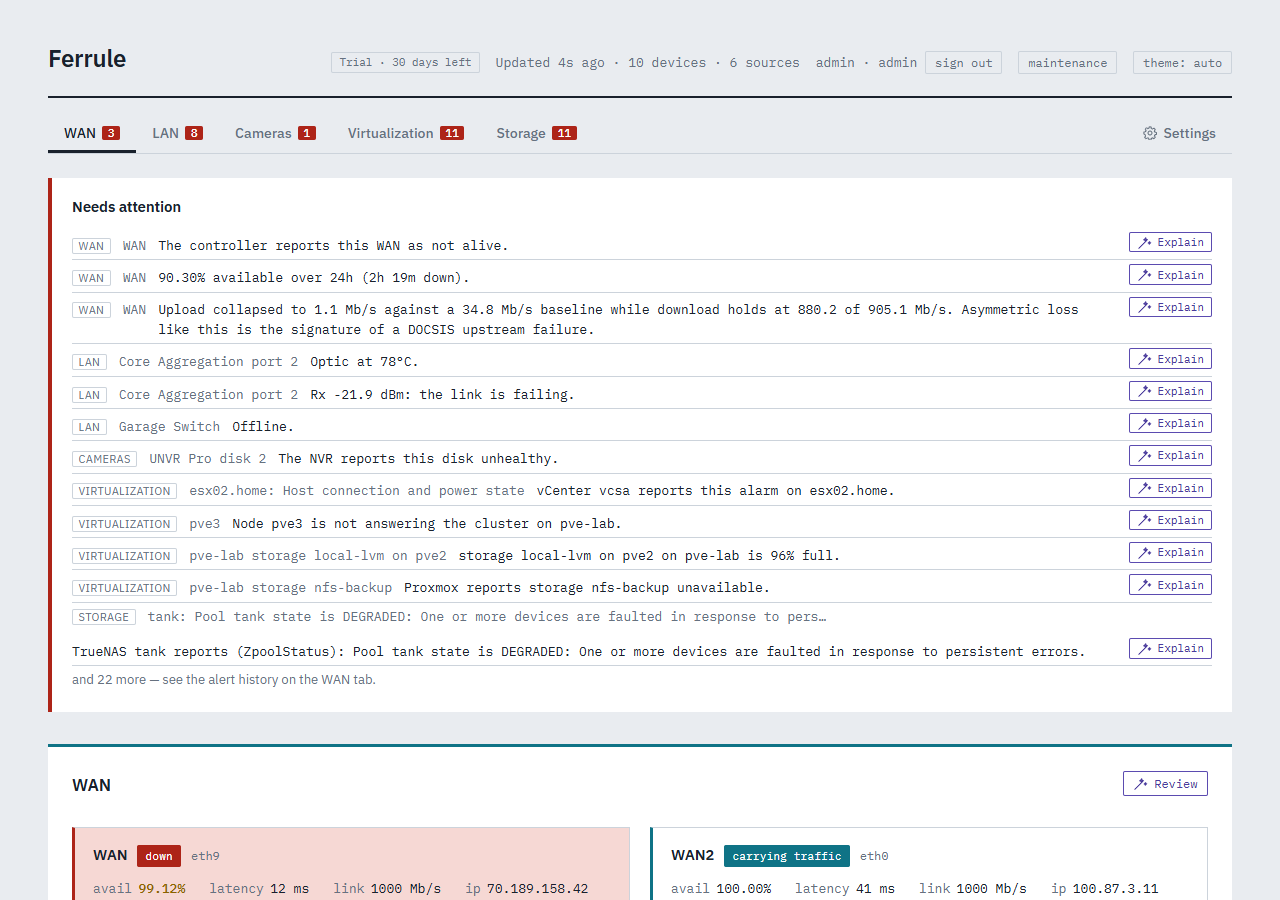
|
||||
|
||||
## Contents
|
||||
|
||||
- [What it watches](#what-it-watches)
|
||||
- [How it works](#how-it-works)
|
||||
- [What you need](#what-you-need)
|
||||
- [Install](#install)
|
||||
- [Updating](#updating)
|
||||
- [Alerts and notifications](#alerts-and-notifications)
|
||||
- [Editions](#editions)
|
||||
- [Help and feedback](#help-and-feedback)
|
||||
|
||||
## What it watches
|
||||
|
||||
| Source | What Collimo reads | Set it up |
|
||||
|---|---|---|
|
||||
| **UniFi Network** | Fan speeds, temperatures, per-port errors and link speeds, SFP optics, PoE draw, Wi-Fi radios and the channel plan, both WAN links, the cable modem, speed tests, outage history | [Guide](https://docs.collimo.dev/connect/unifi-network/) |
|
||||
| **UniFi Protect** | Every camera's state, the recorder's disks and their health, its CPU temperature, each camera's throughput | [Guide](https://docs.collimo.dev/connect/unifi-protect/) |
|
||||
| **VMware vCenter and ESXi** | Hosts, maintenance mode, CPU, memory, ESXi build; datastores; VM power state and the busiest VMs; vCenter's alarms | [Guide](https://docs.collimo.dev/connect/vcenter/) |
|
||||
| **Proxmox VE and Ceph** | Nodes, quorum, storage use, guests and the busiest of them, Ceph health | [Guide](https://docs.collimo.dev/connect/proxmox/) |
|
||||
| **Proxmox Backup Server** | The backup server's health and capacity: datastore use and its own fill estimate, the past week's jobs, when each machine was last backed up | [Guide](https://docs.collimo.dev/connect/pbs/) |
|
||||
| **Synology DSM** | Model, DSM version, CPU, memory, temperature; volumes and RAID; drives and their SMART verdicts | [Guide](https://docs.collimo.dev/connect/synology/) |
|
||||
| **QNAP** (SNMPv3) | CPU, memory, temperatures and fans; disks and M.2 drives; storage pools | [Guide](https://docs.collimo.dev/connect/qnap/) |
|
||||
| **TrueNAS** | Pools, disk read, write and checksum errors, temperatures, TrueNAS's own alerts | [Guide](https://docs.collimo.dev/connect/truenas/) |
|
||||
| **Managed switches** (SNMP) | Cisco, Juniper, Aruba, MikroTik and others: ports, speeds, errors, VLANs, temperatures and fans, LLDP neighbours; on Cisco and Juniper also CPU, memory, power supplies, optics and chassis alarms | [Guide](https://docs.collimo.dev/connect/snmp-switches/) |
|
||||
| **UPS** (SNMP) | On mains or battery, charge, runtime left, load, voltages, battery alarms | [Guide](https://docs.collimo.dev/connect/ups/) |
|
||||
| **PDUs** (SNMP) | APC, Raritan and Eaton: draw against the rating, banks, and each outlet | [Guide](https://docs.collimo.dev/connect/pdu/) |
|
||||
| **Servers** (Redfish) | Dell iDRAC, HPE iLO, Supermicro, Lenovo XCC: health, temperatures, fans, power supplies, drives | [Guide](https://docs.collimo.dev/connect/redfish/) |
|
||||
| **phpIPAM and NetBox** | Free addresses, racks and outlets, for capacity planning to check against | [Guide](https://docs.collimo.dev/connect/ipam/) |
|
||||
| **Anything else** | Up-checks by ping, HTTP or TCP: is it answering, and how quickly | [Guide](https://docs.collimo.dev/connect/up-checks/) |
|
||||
|
||||
No UniFi? Collimo can watch only your servers and storage. See [Watching without UniFi](https://docs.collimo.dev/connect/without-unifi/).
|
||||
|
||||
<table>
|
||||
<tr>
|
||||
<td width="50%"><img src="https://docs.collimo.dev/images/faceplate.png" alt="A switch drawn as its front panel"><br><sub><b>The front panel.</b> Odd ports on top, even below, SFP cages to the right, each lit for its speed. A red outline means errors climbing now; a dashed amber one, slower than that port has run.</sub></td>
|
||||
<td width="50%"><img src="https://docs.collimo.dev/images/docsis.png" alt="The cable modem"><br><sub><b>The modem.</b> Why it last re-initialised, and whether it rebooted through an outage.</sub></td>
|
||||
</tr>
|
||||
<tr>
|
||||
<td width="50%"><img src="https://docs.collimo.dev/images/outage-ledger.png" alt="The outage ledger"><br><sub><b>The outage ledger.</b> Every outage, its cause, and availability with how much of the window the archive covers.</sub></td>
|
||||
<td width="50%"><img src="https://docs.collimo.dev/images/virtualization.png" alt="The Virtualization tab"><br><sub><b>Virtualization and storage.</b> Hosts, guests, pools and disks beside the network.</sub></td>
|
||||
</tr>
|
||||
</table>
|
||||
|
||||
## How it works
|
||||
|
||||
```
|
||||
UniFi consoles vCenter · Proxmox · PBS Synology · QNAP · TrueNAS
|
||||
\ | /
|
||||
\______ read-only accounts, polled _________/
|
||||
|
|
||||
+------------------+ +--------------------+
|
||||
| collimo | -----> | VictoriaMetrics |
|
||||
| collector, UI, | push | history, graphs |
|
||||
| outage archive | +--------------------+
|
||||
+------------------+
|
||||
| |
|
||||
dashboard on :8090 alerts: Gotify, ntfy, Pushover, Discord, email, ...
|
||||
```
|
||||
|
||||
- **`collimo`** reads your equipment, keeps the outage archive and serves the dashboard and `/metrics`.
|
||||
- **`collimo-victoria-metrics`** stores the history behind the graphs.
|
||||
- Both keep their data on Docker volumes. Nothing is written to the host's own folders, and redeploying never loses anything.
|
||||
|
||||
## What you need
|
||||
|
||||
- A Docker host with **Portainer** or **Docker Compose**, and outbound
|
||||
internet access to download the images.
|
||||
- At least one thing to watch:
|
||||
- a UniFi console (gateway, and a UNVR for Protect);
|
||||
- or Proxmox VE, Proxmox Backup Server, vCenter/ESXi;
|
||||
- or a Synology, QNAP or TrueNAS.
|
||||
- **A license key**, if you're a beta tester; you'll get it from us. Without
|
||||
one, Ferrule starts a 30-day trial of the paid features. When the trial
|
||||
ends, it keeps monitoring, with the paid features paused.
|
||||
- A Docker host with **Portainer** or **Docker Compose**, amd64 or arm64, with outbound internet access to download the images.
|
||||
- At least one thing to watch from the table above.
|
||||
- A **read-only account** on each. The wizard links to the steps for every system.
|
||||
- **Your beta license key.** During the private beta Collimo needs one to run; the wizard asks for it. Ask for one on the [Collimo Discord](https://discord.collimo.dev): see [Get a beta key](https://docs.collimo.dev/start/beta-key/).
|
||||
|
||||
## Install
|
||||
|
||||
1. **Create read-only accounts** on what you'll watch, such as a UniFi API
|
||||
key and a local read-only admin. Each system's exact steps are under
|
||||
[Connect your gear](https://docs.ferrulehq.dev/connect/unifi-network/).
|
||||
2. **Get the stack:**
|
||||
- **Portainer:** Stacks → Add stack → name `ferrule` → **Repository**,
|
||||
with URL `https://github.com/ferrulehq/ferrule-deploy`,
|
||||
reference `refs/heads/main`, compose path `docker-compose.yml`, and
|
||||
authentication **off**.
|
||||
- **Docker Compose:**
|
||||
```sh
|
||||
git clone https://github.com/ferrulehq/ferrule-deploy.git ferrule
|
||||
cd ferrule
|
||||
cp stack.env.example .env
|
||||
```
|
||||
3. **Fill in the settings** from [`stack.env.example`](stack.env.example):
|
||||
your hosts and credentials. Keep `FERRULE_VERSION` as it is: it's the
|
||||
current release. Set `UNIFI_ENABLED=false` if you have no UniFi console.
|
||||
- **Portainer:** paste them under **Environment variables** (Advanced
|
||||
mode).
|
||||
- **Docker Compose:** edit `.env`.
|
||||
4. **Start it:** **Deploy the stack** in Portainer, or `docker compose up -d`.
|
||||
Then open `http://<docker host>:8090`.
|
||||
5. **Settings → License:** paste your key and press **Apply**. It shows
|
||||
"Waiting for the first check-in" for up to about two hours, then
|
||||
"Confirmed online".
|
||||
You don't type any settings here. Collimo opens a setup wizard in your browser, asks for them, and writes them for you.
|
||||
|
||||
Once it's running, **Settings → Stack environment** writes the lines for
|
||||
everything else: hypervisors, storage, notifications and sign-in.
|
||||
**1. Create the stack.**
|
||||
|
||||
<details open>
|
||||
<summary><b>Portainer</b></summary>
|
||||
|
||||
1. **Stacks → Add stack.** Name it `collimo`.
|
||||
2. **Build method:** Repository.
|
||||
|
||||
| Field | Value |
|
||||
|---|---|
|
||||
| Repository URL | `https://github.com/collimohq/collimo-deploy` |
|
||||
| Repository reference | `refs/heads/main` |
|
||||
| Compose path | `docker-compose.yml` |
|
||||
| Authentication | **off** |
|
||||
|
||||
3. Leave **Environment variables** empty, and click **Deploy the stack**.
|
||||
|
||||
</details>
|
||||
|
||||
<details>
|
||||
<summary><b>Docker Compose</b></summary>
|
||||
|
||||
```sh
|
||||
git clone https://github.com/collimohq/collimo-deploy.git collimo
|
||||
cd collimo
|
||||
docker compose up -d
|
||||
```
|
||||
|
||||
Keep this folder: your settings go in a `.env` file here.
|
||||
|
||||
</details>
|
||||
|
||||
**2. Open `http://<your docker host>:8090`.** With nothing configured, Collimo opens its setup wizard.
|
||||
|
||||
**3. Follow the wizard.** It tests each connection as you go, and at the end gives you `collimo.env` and the steps to load it into the stack.
|
||||
|
||||
**4. Your key** goes in on the wizard's License step. To change it later, use **Settings → License**.
|
||||
|
||||
Full walkthrough: [Install](https://docs.collimo.dev/start/install/) and [The setup wizard](https://docs.collimo.dev/start/setup-wizard/).
|
||||
|
||||
> [!NOTE]
|
||||
> Collimo's containers have fixed names, so run one Collimo per Docker host. To run a test copy beside a live one, see [Running beside another stack](https://docs.collimo.dev/run/beside-another-stack/).
|
||||
|
||||
## Updating
|
||||
|
||||
When a new release comes out, set `FERRULE_VERSION` to it, then click
|
||||
**Pull and redeploy** in Portainer, or run `docker compose up -d`. Nothing
|
||||
changes until you do.
|
||||
When a release comes out, set `COLLIMO_VERSION` to it, then **Pull and redeploy** in Portainer, or run `docker compose up -d`. Nothing changes until you do. Releases are listed under [Releases](https://github.com/collimohq/collimo-deploy/releases).
|
||||
|
||||
## Alerts and notifications
|
||||
|
||||
Every alert is worked out in Collimo, so the dashboard, the notifications and `/metrics` always agree. Rules set the lowest severity to send per tab or per alert; an alert must hold for a delay before it's sent; quiet hours hold warnings; and maintenance mode keeps planned work from paging anyone.
|
||||
|
||||
| Channel | Edition |
|
||||
|---|---|
|
||||
| Gotify, ntfy, Pushover, Discord, email | All |
|
||||
| Slack, Microsoft Teams, PagerDuty, webhook, Apprise | Paid |
|
||||
|
||||
Details: [Alerts](https://docs.collimo.dev/use/alerts/).
|
||||
|
||||
## Editions
|
||||
|
||||
Collimo will come as **Community** and paid editions, **Business** and **MSP**. The paid editions add sign-in with users and roles, inventory reports, capacity planning, the VMware exit report, alert thresholds and more. During the private beta every install runs on a beta key, with everything on. What each edition has is on [Editions](https://docs.collimo.dev/reference/editions/). Pricing will be announced.
|
||||
|
||||
## Help and feedback
|
||||
|
||||
Everything is at <https://docs.ferrulehq.dev>, including
|
||||
[Troubleshooting](https://docs.ferrulehq.dev/troubleshooting/).
|
||||
[PORTAINER.md](PORTAINER.md) has the full reference too.
|
||||
- 📖 **Documentation:** <https://docs.collimo.dev>, including [Troubleshooting](https://docs.collimo.dev/troubleshooting/)
|
||||
- 💬 **Discord:** beta keys, questions and chat on the [Collimo Discord](https://discord.collimo.dev)
|
||||
- 🐛 **Bugs and feature requests:** [open an issue](https://github.com/collimohq/collimo-deploy/issues/new/choose)
|
||||
- ✉️ **Anything else:** <feedback@collimo.dev>
|
||||
- 📄 **Full deployment reference:** [PORTAINER.md](PORTAINER.md)
|
||||
|
||||
Something unclear, broken or missing? Tell us at
|
||||
<[email protected]>.
|
||||
Your license key is checked once a day against a signed list at `https://license.collimo.dev/revoked`. That's a plain download: nothing about you, your network or your install is sent.
|
||||
|
||||
Your license key is checked once a day against a signed list at
|
||||
`https://license.ferrulehq.dev/revoked`. That's a plain download: nothing
|
||||
about you, your network or your install is sent.
|
||||
Every image carries its software bill of materials (CycloneDX) at `/sbom.cdx.json`, and each release adds it here under `sbom/`. Security problems: see [Reporting a security problem](https://docs.collimo.dev/reference/security/).
|
||||
|
||||
---
|
||||
|
||||
Ferrule is an independent project, not affiliated with Ubiquiti or the
|
||||
other vendors it names. See [LICENSE](LICENSE) for the terms.
|
||||
Collimo and the Collimo logo are trademarks of COLLIMO LLC. © 2026 COLLIMO LLC. All rights reserved.
|
||||
|
||||
UniFi, UniFi Protect and UniFi OS are trademarks of Ubiquiti Inc. VMware, vCenter and ESXi are trademarks of Broadcom Inc. and its subsidiaries; Proxmox of Proxmox Server Solutions GmbH; Synology, QNAP, TrueNAS and the other products named here of their respective owners. They are named only to describe what Collimo reads from, runs on, or sends to. Collimo is an independent project and is not affiliated with, sponsored by, or endorsed by any of them. See [LICENSE](LICENSE) for the terms.
|
||||

Binary file not shown.
|
After Width: | Height: | Size: 141 KiB |
@@ -4,7 +4,7 @@
|
||||
#
|
||||
# BACKUP_SMB_SERVER=192.168.1.20 the server
|
||||
# BACKUP_SMB_SHARE=backups the share
|
||||
# BACKUP_SMB_USERNAME=ferrule an account that can write to it
|
||||
# BACKUP_SMB_USERNAME=collimo an account that can write to it
|
||||
# BACKUP_SMB_PASSWORD=... its password; no commas
|
||||
# BACKUP_SMB_VERSION=3.0 optional
|
||||
#
|
||||
|
||||
@@ -12,7 +12,7 @@
|
||||
# IGOTIFY_HOSTNAME=igotify.example.com (only with COMPOSE_PROFILES igotify)
|
||||
# TRAEFIK_MIDDLEWARES=internal-ipallowlist@file (the default)
|
||||
#
|
||||
# Router names carry a ferrule- prefix so they never collide with routers an
|
||||
# Router names carry a collimo- prefix so they never collide with routers an
|
||||
# existing Gotify on the same Traefik already uses.
|
||||
#
|
||||
# Each container sits on two networks, its stack's own and the proxy one, so
|
||||
@@ -36,9 +36,9 @@ services:
|
||||
TRAEFIK_MIDDLEWARES: ${TRAEFIK_MIDDLEWARES:-internal-ipallowlist@file}
|
||||
labels:
|
||||
- traefik.enable=true
|
||||
- traefik.http.services.ferrule.loadbalancer.server.url=http://ferrule:8080
|
||||
- traefik.http.routers.ferrule.rule=Host(`${TELEMETRY_HOSTNAME:-telemetry.localhost}`)
|
||||
- traefik.http.routers.ferrule.middlewares=${TRAEFIK_MIDDLEWARES:-internal-ipallowlist@file}
|
||||
- traefik.http.services.collimo.loadbalancer.server.url=http://collimo:8080
|
||||
- traefik.http.routers.collimo.rule=Host(`${TELEMETRY_HOSTNAME:-telemetry.localhost}`)
|
||||
- traefik.http.routers.collimo.middlewares=${TRAEFIK_MIDDLEWARES:-internal-ipallowlist@file}
|
||||
|
||||
gotify:
|
||||
networks:
|
||||
@@ -46,9 +46,9 @@ services:
|
||||
- hms-docker_proxy_net
|
||||
labels:
|
||||
- traefik.enable=true
|
||||
- traefik.http.services.ferrule-gotify.loadbalancer.server.url=http://ferrule-gotify:80
|
||||
- traefik.http.routers.ferrule-gotify.rule=Host(`${GOTIFY_HOSTNAME:-gotify.localhost}`)
|
||||
- traefik.http.routers.ferrule-gotify.middlewares=${TRAEFIK_MIDDLEWARES:-internal-ipallowlist@file}
|
||||
- traefik.http.services.collimo-gotify.loadbalancer.server.url=http://collimo-gotify:80
|
||||
- traefik.http.routers.collimo-gotify.rule=Host(`${GOTIFY_HOSTNAME:-gotify.localhost}`)
|
||||
- traefik.http.routers.collimo-gotify.middlewares=${TRAEFIK_MIDDLEWARES:-internal-ipallowlist@file}
|
||||
|
||||
igotify:
|
||||
networks:
|
||||
@@ -56,9 +56,9 @@ services:
|
||||
- hms-docker_proxy_net
|
||||
labels:
|
||||
- traefik.enable=true
|
||||
- traefik.http.services.ferrule-igotify.loadbalancer.server.url=http://ferrule-igotify:8080
|
||||
- traefik.http.routers.ferrule-igotify.rule=Host(`${IGOTIFY_HOSTNAME:-igotify.localhost}`)
|
||||
- traefik.http.routers.ferrule-igotify.middlewares=${TRAEFIK_MIDDLEWARES:-internal-ipallowlist@file}
|
||||
- traefik.http.services.collimo-igotify.loadbalancer.server.url=http://collimo-igotify:8080
|
||||
- traefik.http.routers.collimo-igotify.rule=Host(`${IGOTIFY_HOSTNAME:-igotify.localhost}`)
|
||||
- traefik.http.routers.collimo-igotify.middlewares=${TRAEFIK_MIDDLEWARES:-internal-ipallowlist@file}
|
||||
|
||||
networks:
|
||||
hms-docker_proxy_net:
|
||||
|
||||
+65
-29
@@ -1,7 +1,7 @@
|
||||
# Single compose file for both paths.
|
||||
#
|
||||
# Ferrule runs from its published image, a built binary: no source reaches
|
||||
# the Docker host. FERRULE_VERSION picks the release and is required.
|
||||
# Collimo runs from its published image, a built binary: no source reaches
|
||||
# the Docker host. COLLIMO_VERSION picks the release.
|
||||
# docker-compose.build.yml, added beside this file, builds from source
|
||||
# instead, for development.
|
||||
#
|
||||
@@ -18,16 +18,18 @@
|
||||
|
||||
services:
|
||||
telemetry:
|
||||
# The published image, at the release FERRULE_VERSION names: 0.9.0, or
|
||||
# qa for what is under test. Required, so a stack never drifts onto a
|
||||
# version nobody chose, and never latest. FERRULE_IMAGE is the registry
|
||||
# path, one line to change when it moves. Its own container names keep
|
||||
# it apart from an earlier stack of this project on the same host.
|
||||
image: ${FERRULE_IMAGE:-ghcr.io/ferrulehq/ferrule}:${FERRULE_VERSION:?set FERRULE_VERSION to the release to run, such as 0.9.0}
|
||||
# The published image, at the release COLLIMO_VERSION names: 0.9.0, or
|
||||
# qa for what is under test, and never latest. COLLIMO_IMAGE is the
|
||||
# registry path, one line to change when it moves. Its own container
|
||||
# names keep it apart from an earlier stack of this project on the same
|
||||
# host.
|
||||
# Each release writes its own version and registry in as the defaults,
|
||||
# so a blank stack runs it.
|
||||
image: ${COLLIMO_IMAGE:-ghcr.io/collimohq/collimo}:${COLLIMO_VERSION:-0.1.1}
|
||||
# Ask the registry on every deploy. A fixed release costs one quick
|
||||
# request; qa moves, and this is how a redeploy picks it up.
|
||||
pull_policy: always
|
||||
container_name: ferrule
|
||||
container_name: collimo
|
||||
restart: unless-stopped
|
||||
environment:
|
||||
# false turns off Network, Protect, WAN and the probe, for a stack that
|
||||
@@ -39,6 +41,7 @@ services:
|
||||
UNIFI_USERNAME: ${UNIFI_USERNAME:-}
|
||||
UNIFI_PASSWORD: ${UNIFI_PASSWORD:-}
|
||||
UNIFI_SITE: ${UNIFI_SITE:-default}
|
||||
PORT_SLEEPS: ${PORT_SLEEPS:-}
|
||||
# Protect on separate hardware (a UNVR) needs its own host and its own
|
||||
# credentials — the gateway's do not work on it. Leave these unset when
|
||||
# one console runs both applications.
|
||||
@@ -69,7 +72,7 @@ services:
|
||||
# The outage archive. Fixed path because it is a named volume, not a
|
||||
# host path — Portainer stacks cannot resolve relative host paths, and a
|
||||
# named volume needs none.
|
||||
LEDGER_PATH: /var/lib/ferrule/ledger.jsonl
|
||||
LEDGER_PATH: /var/lib/collimo/ledger.jsonl
|
||||
LEDGER_RETENTION: ${LEDGER_RETENTION:-8760h}
|
||||
|
||||
# Demarcation probe. Unset PROBE_TARGETS leaves it off. Point
|
||||
@@ -100,6 +103,11 @@ services:
|
||||
SOURCE_8: ${SOURCE_8:-}
|
||||
SOURCE_8_SECRET: ${SOURCE_8_SECRET:-}
|
||||
|
||||
# Up-checks: ping, HTTP or a TCP port for anything with an address,
|
||||
# entries separated by ; such as
|
||||
# CHECKS=ping 192.168.1.20 name=printer; http https://nas.lab:5001 name=nas
|
||||
CHECKS: ${CHECKS:-}
|
||||
|
||||
# Sign-in. Off until ADMIN_PASSWORD (free) or OIDC_* / LDAP_* (paid)
|
||||
# are set. See PORTAINER.md.
|
||||
ADMIN_USERNAME: ${ADMIN_USERNAME:-admin}
|
||||
@@ -127,7 +135,15 @@ services:
|
||||
|
||||
# The license key, when there is one. Without it every install runs a
|
||||
# 30-day trial of the paid features, then carries on as Community.
|
||||
FERRULE_LICENSE: ${FERRULE_LICENSE:-}
|
||||
COLLIMO_LICENSE: ${COLLIMO_LICENSE:-}
|
||||
|
||||
# Several sites, for an MSP (ADR-0044): a collector at each client
|
||||
# site reports to one hub, calling out only. Unset is one site on its
|
||||
# own.
|
||||
COLLIMO_ROLE: ${COLLIMO_ROLE:-standalone}
|
||||
HUB_URL: ${HUB_URL:-}
|
||||
HUB_ENROL: ${HUB_ENROL:-}
|
||||
HUB_LINK: ${HUB_LINK:-normal}
|
||||
|
||||
# Notification channels. Each is off until its variables are set; any
|
||||
# number can be on. Slack, Teams, PagerDuty and the webhook are paid.
|
||||
@@ -135,6 +151,10 @@ services:
|
||||
# force; see PORTAINER.md for what each variable means.
|
||||
GOTIFY_URL: ${GOTIFY_URL:-}
|
||||
GOTIFY_TOKEN: ${GOTIFY_TOKEN:-}
|
||||
# With the bundled Gotify and no token, Collimo makes a shared
|
||||
# collimo-alerts account and its own app, using the admin password.
|
||||
GOTIFY_ALERTS_PASSWORD: ${GOTIFY_ALERTS_PASSWORD:-}
|
||||
GOTIFY_ADMIN_PASSWORD: ${GOTIFY_ADMIN_PASSWORD:-}
|
||||
NTFY_URL: ${NTFY_URL:-}
|
||||
NTFY_TOKEN: ${NTFY_TOKEN:-}
|
||||
PUSHOVER_TOKEN: ${PUSHOVER_TOKEN:-}
|
||||
@@ -147,6 +167,8 @@ services:
|
||||
SMTP_PASSWORD: ${SMTP_PASSWORD:-}
|
||||
SMTP_FROM: ${SMTP_FROM:-}
|
||||
SMTP_TO: ${SMTP_TO:-}
|
||||
# open or all when SMTP_TO is a help desk's mailbox: one ticket per alert
|
||||
SMTP_TICKETS: ${SMTP_TICKETS:-}
|
||||
SLACK_WEBHOOK_URL: ${SLACK_WEBHOOK_URL:-}
|
||||
TEAMS_WEBHOOK_URL: ${TEAMS_WEBHOOK_URL:-}
|
||||
PAGERDUTY_ROUTING_KEY: ${PAGERDUTY_ROUTING_KEY:-}
|
||||
@@ -189,10 +211,24 @@ services:
|
||||
INVENTORY_AT: ${INVENTORY_AT:-02:30}
|
||||
# Days of inventory history: a year by default; 2557 keeps seven years.
|
||||
INVENTORY_KEEP: ${INVENTORY_KEEP:-365}
|
||||
# Capacity planning (paid): forecast thresholds in %, runway alert
|
||||
# days, allocation limits, and hosts kept spare per cluster.
|
||||
CAPACITY_THRESHOLDS: ${CAPACITY_THRESHOLDS:-cpu=80,mem=80,disk=85,pool=85}
|
||||
CAPACITY_RUNWAY: ${CAPACITY_RUNWAY:-warn=90,bad=30}
|
||||
CAPACITY_RATIOS: ${CAPACITY_RATIOS:-vcpu=4,vmem=1,disk=1.5}
|
||||
CAPACITY_VM_SIZE: ${CAPACITY_VM_SIZE:-vcpu=4,mem=16,disk=100}
|
||||
CAPACITY_HA: ${CAPACITY_HA:-}
|
||||
# The monthly capacity summary: who gets it, whose name is on it, and
|
||||
# the host "What to buy" plans in (empty: each cluster's largest).
|
||||
CAPACITY_SUMMARY_TO: ${CAPACITY_SUMMARY_TO:-}
|
||||
CAPACITY_SUMMARY_BY: ${CAPACITY_SUMMARY_BY:-}
|
||||
CAPACITY_HOST: ${CAPACITY_HOST:-}
|
||||
# Rated endurance per drive model, for disk wear: CT1000P310SSD8=220
|
||||
CAPACITY_DISK_TBW: ${CAPACITY_DISK_TBW:-}
|
||||
# A copy of every inventory in PostgreSQL, for Grafana and Power BI
|
||||
# (paid). For the stack's own, add "postgres" to COMPOSE_PROFILES and
|
||||
# set INVENTORY_DB_PASSWORD; for one you run, set INVENTORY_DB_URL. The
|
||||
# reader password makes a read-only ferrule_reader role for reports.
|
||||
# reader password makes a read-only collimo_reader role for reports.
|
||||
INVENTORY_DB_URL: ${INVENTORY_DB_URL:-}
|
||||
INVENTORY_DB_PASSWORD: ${INVENTORY_DB_PASSWORD:-}
|
||||
INVENTORY_DB_READER_PASSWORD: ${INVENTORY_DB_READER_PASSWORD:-}
|
||||
@@ -202,7 +238,7 @@ services:
|
||||
# that mounts an NFS or SMB share (docker-compose.backup-nfs.yml,
|
||||
# docker-compose.backup-smb.yml); BACKUP_S3_* is object storage, paid.
|
||||
# See PORTAINER.md.
|
||||
BACKUP_NAME: ${BACKUP_NAME:-ferrule}
|
||||
BACKUP_NAME: ${BACKUP_NAME:-collimo}
|
||||
BACKUP_KEY: ${BACKUP_KEY:-}
|
||||
BACKUP_AT: ${BACKUP_AT:-03:30}
|
||||
BACKUP_HISTORY: ${BACKUP_HISTORY:-true}
|
||||
@@ -213,7 +249,7 @@ services:
|
||||
BACKUP_S3_ENDPOINT: ${BACKUP_S3_ENDPOINT:-}
|
||||
BACKUP_S3_REGION: ${BACKUP_S3_REGION:-us-east-1}
|
||||
BACKUP_S3_BUCKET: ${BACKUP_S3_BUCKET:-}
|
||||
BACKUP_S3_PREFIX: ${BACKUP_S3_PREFIX:-ferrule}
|
||||
BACKUP_S3_PREFIX: ${BACKUP_S3_PREFIX:-collimo}
|
||||
BACKUP_S3_ACCESS_KEY: ${BACKUP_S3_ACCESS_KEY:-}
|
||||
BACKUP_S3_SECRET_KEY: ${BACKUP_S3_SECRET_KEY:-}
|
||||
DASHBOARD_URL: ${DASHBOARD_URL:-}
|
||||
@@ -230,8 +266,8 @@ services:
|
||||
# Stack environment can start from what is set. Never a secret.
|
||||
COMPOSE_PROFILES: ${COMPOSE_PROFILES:-}
|
||||
WEB_PORT: ${WEB_PORT:-8090}
|
||||
FERRULE_IMAGE: ${FERRULE_IMAGE:-ghcr.io/ferrulehq/ferrule}
|
||||
FERRULE_VERSION: ${FERRULE_VERSION:-}
|
||||
COLLIMO_IMAGE: ${COLLIMO_IMAGE:-ghcr.io/collimohq/collimo}
|
||||
COLLIMO_VERSION: ${COLLIMO_VERSION:-}
|
||||
RETENTION: ${RETENTION:-13w}
|
||||
GOTIFY_ADMIN_USER: ${GOTIFY_ADMIN_USER:-admin}
|
||||
GOTIFY_PORT: ${GOTIFY_PORT:-8091}
|
||||
@@ -249,7 +285,7 @@ services:
|
||||
# resolve. The root filesystem stays read-only; this is the one writable
|
||||
# mount, and it is what makes the outage archive outlive the controller
|
||||
# 21-hour window.
|
||||
- ledger-data:/var/lib/ferrule
|
||||
- ledger-data:/var/lib/collimo
|
||||
sysctls:
|
||||
# Lets the container open an unprivileged ICMP datagram socket for the
|
||||
# demarcation probe, with cap_drop: ALL still in force. The range must
|
||||
@@ -260,7 +296,7 @@ services:
|
||||
- victoria-metrics
|
||||
healthcheck:
|
||||
# The image is scratch — no shell, no curl. The binary probes itself.
|
||||
test: ["CMD", "/ferrule", "-healthcheck"]
|
||||
test: ["CMD", "/collimo", "-healthcheck"]
|
||||
interval: 30s
|
||||
timeout: 5s
|
||||
retries: 3
|
||||
@@ -281,7 +317,7 @@ services:
|
||||
victoria-metrics:
|
||||
# Pin to a release tag once you have one you are happy with.
|
||||
image: victoriametrics/victoria-metrics:latest
|
||||
container_name: ferrule-victoria-metrics
|
||||
container_name: collimo-victoria-metrics
|
||||
restart: unless-stopped
|
||||
command:
|
||||
- "-storageDataPath=/victoria-metrics-data"
|
||||
@@ -318,7 +354,7 @@ services:
|
||||
gotify:
|
||||
profiles: ["gotify"]
|
||||
image: gotify/server:latest
|
||||
container_name: ferrule-gotify
|
||||
container_name: collimo-gotify
|
||||
restart: unless-stopped
|
||||
environment:
|
||||
GOTIFY_DEFAULTUSER_NAME: ${GOTIFY_ADMIN_USER:-admin}
|
||||
@@ -339,7 +375,7 @@ services:
|
||||
igotify:
|
||||
profiles: ["igotify"]
|
||||
image: ghcr.io/androidseb25/igotify-notification-assist:latest
|
||||
container_name: ferrule-igotify
|
||||
container_name: collimo-igotify
|
||||
hostname: igotify
|
||||
restart: unless-stopped
|
||||
pull_policy: always
|
||||
@@ -360,23 +396,23 @@ services:
|
||||
# ---- Optional: PostgreSQL, for the inventory's database copy ----------
|
||||
#
|
||||
# Starts only with "postgres" in COMPOSE_PROFILES. Set
|
||||
# INVENTORY_DB_PASSWORD and the collector finds it at ferrule-postgres on
|
||||
# INVENTORY_DB_PASSWORD and the collector finds it at collimo-postgres on
|
||||
# its own; nothing else to set. It holds a copy: the inventory files on
|
||||
# ledger-data stay the master and travel with the backups, and the copy is
|
||||
# rebuilt from them, so this volume needs no backup of its own.
|
||||
#
|
||||
# Grafana and Power BI connect with their own PostgreSQL connectors, as
|
||||
# ferrule_reader with INVENTORY_DB_READER_PASSWORD, never as the writer.
|
||||
# collimo_reader with INVENTORY_DB_READER_PASSWORD, never as the writer.
|
||||
# The port listens on the Docker host's loopback only; set
|
||||
# INVENTORY_DB_BIND=0.0.0.0 for a reporting tool on another machine.
|
||||
postgres:
|
||||
profiles: ["postgres"]
|
||||
image: postgres:18-alpine
|
||||
container_name: ferrule-postgres
|
||||
container_name: collimo-postgres
|
||||
restart: unless-stopped
|
||||
environment:
|
||||
POSTGRES_USER: ferrule
|
||||
POSTGRES_DB: ferrule
|
||||
POSTGRES_USER: collimo
|
||||
POSTGRES_DB: collimo
|
||||
# The image refuses to start without one, so a missing password shows
|
||||
# here rather than as an open database.
|
||||
POSTGRES_PASSWORD: ${INVENTORY_DB_PASSWORD:-}
|
||||
@@ -387,7 +423,7 @@ services:
|
||||
ports:
|
||||
- "${INVENTORY_DB_BIND:-127.0.0.1}:${INVENTORY_DB_PORT:-5432}:5432"
|
||||
# Postgres sets POSTGRES_PASSWORD only when its volume is first made, so
|
||||
# changing INVENTORY_DB_PASSWORD later left Ferrule refused. The first
|
||||
# changing INVENTORY_DB_PASSWORD later left Collimo refused. The first
|
||||
# check in each container sets the password from the environment, over
|
||||
# the container's own socket, which needs none, and marks /tmp so it is
|
||||
# done once: a redeploy with a new password is a new container with an
|
||||
@@ -396,7 +432,7 @@ services:
|
||||
# password reaches SQL as a psql variable, so no quote in it can break
|
||||
# the statement.
|
||||
healthcheck:
|
||||
test: ["CMD-SHELL", "pg_isready -U ferrule -d ferrule && { [ -f /tmp/ferrule-password-set ] || { echo \"ALTER ROLE ferrule PASSWORD :'pw';\" | psql -U ferrule -d ferrule -q -v ON_ERROR_STOP=1 -v pw=\"$$POSTGRES_PASSWORD\" >/dev/null && touch /tmp/ferrule-password-set; }; }"]
|
||||
test: ["CMD-SHELL", "pg_isready -U collimo -d collimo && { [ -f /tmp/collimo-password-set ] || { echo \"ALTER ROLE collimo PASSWORD :'pw';\" | psql -U collimo -d collimo -q -v ON_ERROR_STOP=1 -v pw=\"$$POSTGRES_PASSWORD\" >/dev/null && touch /tmp/collimo-password-set; }; }"]
|
||||
interval: 30s
|
||||
timeout: 5s
|
||||
retries: 3
|
||||
@@ -411,7 +447,7 @@ services:
|
||||
apprise:
|
||||
profiles: ["apprise"]
|
||||
image: caronc/apprise:latest
|
||||
container_name: ferrule-apprise
|
||||
container_name: collimo-apprise
|
||||
hostname: apprise
|
||||
restart: unless-stopped
|
||||
pull_policy: always
|
||||
|
||||
@@ -0,0 +1,47 @@
|
||||
{
|
||||
"bomFormat": "CycloneDX",
|
||||
"specVersion": "1.5",
|
||||
"serialNumber": "urn:uuid:f330aedf-dba8-410a-9613-4c5af7242265",
|
||||
"version": 1,
|
||||
"metadata": {
|
||||
"timestamp": "2026-10-22T20:48:48Z",
|
||||
"component": {
|
||||
"type": "container",
|
||||
"bom-ref": "collimo-image",
|
||||
"name": "collimo",
|
||||
"version": "0.1.1",
|
||||
"purl": "pkg:oci/[email protected]?repository_url=ghcr.io/collimohq/collimo&arch=amd64",
|
||||
"properties": [{"name": "base-image", "value": "scratch"}]
|
||||
}
|
||||
},
|
||||
"components": [
|
||||
{
|
||||
"type": "application",
|
||||
"bom-ref": "collimo",
|
||||
"name": "collimo",
|
||||
"version": "0.1.1",
|
||||
"description": "The Collimo collector, a static linux/amd64 binary",
|
||||
"purl": "pkg:generic/collimohq/[email protected]?arch=amd64"
|
||||
},
|
||||
{
|
||||
"type": "library",
|
||||
"bom-ref": "golang-stdlib",
|
||||
"name": "stdlib",
|
||||
"version": "1.24.13",
|
||||
"description": "The Go standard library, compiled into the binary",
|
||||
"purl": "pkg:golang/[email protected]"
|
||||
},
|
||||
{
|
||||
"type": "data",
|
||||
"bom-ref": "ca-bundle",
|
||||
"name": "ca-certificates-bundle",
|
||||
"version": "20251003-r0",
|
||||
"description": "The CA certificate bundle at /etc/ssl/certs/ca-certificates.crt",
|
||||
"purl": "pkg:apk/alpine/ca-certificates-bundle@20251003-r0?distro=alpine-3.23.3"
|
||||
}
|
||||
],
|
||||
"dependencies": [
|
||||
{"ref": "collimo-image", "dependsOn": ["collimo", "ca-bundle"]},
|
||||
{"ref": "collimo", "dependsOn": ["golang-stdlib"]}
|
||||
]
|
||||
}
|
||||
@@ -0,0 +1,47 @@
|
||||
{
|
||||
"bomFormat": "CycloneDX",
|
||||
"specVersion": "1.5",
|
||||
"serialNumber": "urn:uuid:2b431bd4-f4c1-4b6d-9e7e-bf9b4e66e5ba",
|
||||
"version": 1,
|
||||
"metadata": {
|
||||
"timestamp": "2026-10-22T20:48:48Z",
|
||||
"component": {
|
||||
"type": "container",
|
||||
"bom-ref": "collimo-image",
|
||||
"name": "collimo",
|
||||
"version": "0.1.1",
|
||||
"purl": "pkg:oci/[email protected]?repository_url=ghcr.io/collimohq/collimo&arch=arm64",
|
||||
"properties": [{"name": "base-image", "value": "scratch"}]
|
||||
}
|
||||
},
|
||||
"components": [
|
||||
{
|
||||
"type": "application",
|
||||
"bom-ref": "collimo",
|
||||
"name": "collimo",
|
||||
"version": "0.1.1",
|
||||
"description": "The Collimo collector, a static linux/arm64 binary",
|
||||
"purl": "pkg:generic/collimohq/[email protected]?arch=arm64"
|
||||
},
|
||||
{
|
||||
"type": "library",
|
||||
"bom-ref": "golang-stdlib",
|
||||
"name": "stdlib",
|
||||
"version": "1.24.13",
|
||||
"description": "The Go standard library, compiled into the binary",
|
||||
"purl": "pkg:golang/[email protected]"
|
||||
},
|
||||
{
|
||||
"type": "data",
|
||||
"bom-ref": "ca-bundle",
|
||||
"name": "ca-certificates-bundle",
|
||||
"version": "20251003-r0",
|
||||
"description": "The CA certificate bundle at /etc/ssl/certs/ca-certificates.crt",
|
||||
"purl": "pkg:apk/alpine/ca-certificates-bundle@20251003-r0?distro=alpine-3.23.3"
|
||||
}
|
||||
],
|
||||
"dependencies": [
|
||||
{"ref": "collimo-image", "dependsOn": ["collimo", "ca-bundle"]},
|
||||
{"ref": "collimo", "dependsOn": ["golang-stdlib"]}
|
||||
]
|
||||
}
|
||||
+4
-4
@@ -2,7 +2,7 @@
|
||||
# variable, this file's and the rest, from what the stack is running with.
|
||||
|
||||
# Required: the release to run, such as 0.9.0, or qa for the build under test.
|
||||
FERRULE_VERSION=0.0.2
|
||||
COLLIMO_VERSION=0.1.1
|
||||
|
||||
# false watches only hypervisors and storage, with no UniFi console at all,
|
||||
# and is what to set while trying this stack beside an existing one.
|
||||
@@ -53,7 +53,7 @@ PROBE_TIMEOUT=2s
|
||||
|
||||
# ---- License -------------------------------------------------------------
|
||||
# Empty runs a 30-day trial of the paid features, then Community.
|
||||
FERRULE_LICENSE=
|
||||
COLLIMO_LICENSE=
|
||||
|
||||
# ---- Notifications ------------------------------------------------------
|
||||
# Each channel is off until its variables are set. Settings -> Notifications
|
||||
@@ -86,7 +86,7 @@ DASHBOARD_URL=
|
||||
# ---- Backups -------------------------------------------------------------
|
||||
# A share needs an overlay: docker-compose.backup-nfs.yml or -smb.yml under
|
||||
# the stack's Additional paths. S3 is paid. See PORTAINER.md.
|
||||
BACKUP_NAME=ferrule
|
||||
BACKUP_NAME=collimo
|
||||
BACKUP_KEY=
|
||||
BACKUP_AT=03:30
|
||||
BACKUP_HISTORY=true
|
||||
@@ -106,7 +106,7 @@ BACKUP_SMB_PASSWORD=
|
||||
BACKUP_S3_ENDPOINT=
|
||||
BACKUP_S3_REGION=us-east-1
|
||||
BACKUP_S3_BUCKET=
|
||||
BACKUP_S3_PREFIX=ferrule
|
||||
BACKUP_S3_PREFIX=collimo
|
||||
BACKUP_S3_ACCESS_KEY=
|
||||
BACKUP_S3_SECRET_KEY=
|
||||
|
||||
|
||||
Reference in new issue
Block a user